31
Jul
2013
For as long as there have been blogs and discussion forums, there have been trolls. A troll is a commenter who hangs around your site primarily to annoy and aggravate you and your readers. Trolling is different from simply being critical. Not all of your readers will agree with everything you write — in fact, we bet your favorite readers are the ones who swing by for a healthy intellectual debate! But a troll’s comments rarely have anything to do with the topic at hand — they’re there to anger and intimidate others, and derail your discussion.
(more…)
Posted by Cheri Lucas Rowlands in community,features
27
Feb
2013
In our last post, we focused on commenting etiquette, so this time, let’s move across the table and talk about moderating your comments.
Your moderation options
IntenseDebate offers some powerful moderation options. On your Moderation Settings page, you can customize your settings to filter and moderate by keywords, the number of links in a comment, and commenters’ email addresses or IP addresses.
You can also enable a profanity filter, ban specific usernames, and automatically approve comments from users who meet a minimum reputation score, which you can specify in your settings.
Comment moderation 101
Sure, you’ve set up your moderation options, but that doesn’t mean you’re done. Comment moderation is a regular part of the blogging process. The discussion you generate is just as important as your content. Here are some moderating tips:
- Reply to comments. Your job doesn’t end when you hit the “publish” button, right? When readers leave comments, keep the conversation going in real time. Use the Reply-By-Email feature to respond swiftly to comments via email — especially when you’re on the go — before your thoughts slip your mind.
- But don’t reply to every comment. If you receive a lot of comments and you reply to each with a simple “thanks,” your discussion will suffer. These comments, while friendly, are terse and ultimately meaningless. Where’s the debate? Your replies should always add something substantial that builds on the conversation, so avoid stagnant, dead-end comments.
- Keep it error-free. Carefully read every comment you approve and edit if needed. While these are other people’s words and thoughts, this is ultimately your site, so treat it like a newspaper or publication. Ensure the copy, whether in your own posts or in the discussion threads, is clean and free of mistakes and misspellings. Trust us — errors looks bad. Period.
- Police, but do so politely. We know you love lively debates, but don’t encourage nasty and abusive comments. They intimidate new readers, derail conversations, and distract you from good blogging. It’s your site — set your rules! Give people polite warnings, but if they continue on with offensive comments, ban them. Your commenters also have the ability to report abusive comments with the “Report” button.
- Post commenting guidelines. If you feel like a sheriff on your own blog — how not fun, right? — consider posting commenting guidelines. It’s a transparent way to let readers know what comments you approve and delete and helps to deter unwanted behavior. (Check out the WordPress.com News blog’s guidelines as an example.)
- Play around with the keyword filter. The keyword filter tool on your Moderation Settings page is handy. Entering a keyword will flag any instance of that particular word, including partial matches, so be careful when adding two or three letter keywords — “the,” for example, includes words like “theme,” “theory,” etc. Once you’ve gotten the hang of it, this filter tool becomes quite powerful.
- Knock on your neighbors’ doors, too. Networking and developing intellectual and professional connections with your readers is one of the best parts of blogging. If you have loyal commenters, visit and comment thoughtfully on their sites as well, keeping in mind the commenting tips you’ve learned.
For more details on moderating comments, visit the moderation support page.
As for IntenseDebate updates, we’ve upgraded servers to PHP5.4 to improve performance, removed OpenID, and fixed a bug with Facebook Connect that prevented you from logging in using Facebook if you were already logged into Facebook.
If you have questions or comments about IntenseDebate, send us a note.
Posted by Cheri Lucas Rowlands in features
3
Feb
2012
Let’s face it, spam happens. While we’ve made a lot of improvements to our Akismet integration to catch future spam from sullying your comments with links to cheap prescription drugs, it’s possible that some spam might have slipped through in the past.
Don’t worry, we’ve got you covered.
There’s a nifty new option in your moderation page to re-check all of your approved comments for spam with the click of a button.
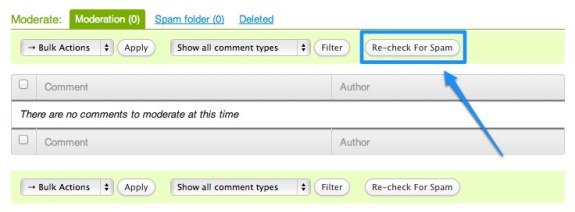
Just click on the “Re-check For Spam” button and we’ll do the heavy lifting for you, and run all of the comments on your site through Akismet again.
Think of all of the time that will save you. While we do that, you can take some time away from your computer and slow things down. Go relax with a beverage and rest your eyes for a bit. You can read an old-fashioned newspaper (you know, the kind that you can tear), or catch-up with a long-lost friend – after all, IntenseDebate is all about connecting people. 😉
When you get back, head over to your moderation page again. If we’ve found any spam, there will be a notification waiting for you. If there isn’t one, then your site is spam free.

Keep in mind that the more comments you have, the longer it will take for us to re-check them all. If you return to your moderation page while we’re still checking, then the “Re-check For Spam” button will be greyed-out and inactive.
You can learn more about the rest of our moderation tools at support.intensedebate.com/moderation and read our past posts on our moderation options here.
Posted by Michael Koenig in features
2
Aug
2010
We released a cool new setting for reported comments (comments that your readers flag as inappropriate). You can now opt to have the comments automatically put into moderation for review. This handy option can help you and your readers keep your comments clean and debates friendly.
To enable this option, visit your Comments Settings, and check the box next to Send comments to moderation when reported (located at the bottom of the page). Make sure you save your settings. This setting excludes comments posted by site admins and moderators, as well as comments that you have already approved.
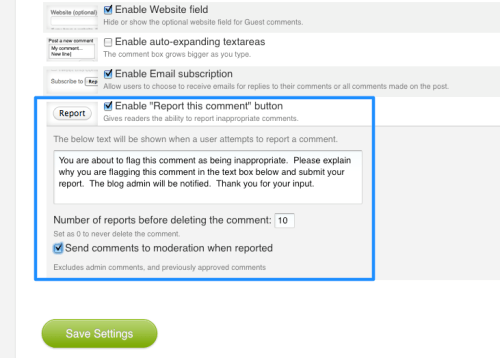
While you’re there you can also take advantage of our Auto-Delete setting for reported comments. With the Auto-Delete option, you can set a maximum number of times that a comment is reported before the comment is deleted. This is another super-handy feature for crowdsourcing moderation.
Both of these options are based entirely on your feedback, and we’re happy to deliver them!
Posted by Michael Koenig in features
24
May
2010
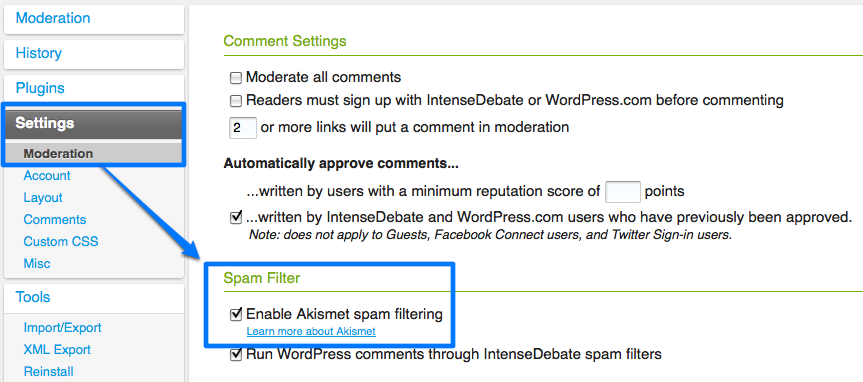
We love it when the entire Automattic team gets together – it gives us an opportunity to hang out and work side-by-side. During our last meetup in San Francisco, fellow Aussies, Beau Lebens and Alex Shiels, sat down to brainstorm some ways to improve our Akismet spam filter integration in IntenseDebate. A short-while later they cranked out a completely reworked integration that has drastically improved the accuracy of our spam filtering.
If you haven’t already, please make sure you enable Akismet in your IntenseDebate account at http://intensedebate.com/edit-site-moderation.
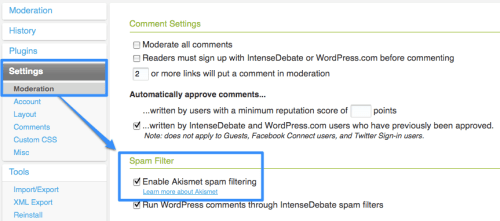
Please give us a shout at support@intensedebate.com if you continue to encounter spam issues. Thanks!
Posted by Michael Koenig in features,News




 IntenseDebate - Official Blog