

Important Update to our Blogger Integration
Over the next couple of weeks Blogger will gradually roll out redirects to country-code URL’s (or ccTLD’s) for all Blogger sites. Per Blogger’s support page:
If you’re in Australia and viewing [blogname].blogspot.com, you might be redirected [blogname].blogspot.com.au. A ccTLD, when it appears, corresponds with the country of the reader’s current location.
This update will unfortunately cause a major issue with our Blogger Widget installation, where the same post will show different sets of comments depending on which ccTLD your readers visit.
The good news is that Blogger sites using our Template installation are all set and will not be affected by this change. You don’t have to do anything, so kick back and relax.
The not-so-good news is that if you are using our Blogger Widget installation, you will need to switch over to our Template installation to ensure that everything runs smoothly. It really is essential that you do this. If it weren’t, we wouldn’t bother you. Don’t worry, we’re here to help and we hope to make this as painless as possible.
Please note:
- You won’t lose any of your existing comments if you follow the instructions below.
- Custom domains are not affected by this change. However, we would ideally like to discontinue our Widget installation. The Template install is much more stable, and future backend updates will most likely only apply for Template installations. We realize that it’s a pain, but it will be worth it in the long run.
Here’s how you can switch over to the Template installation:
- You will first need to uninstall the Widget from your site. The following instructions are for the updated Blogger interface. If you are using the old Blogger interface, please switch over to the new interface temporarily. You can do that by selecting the “Try the updated Blogger interface” link at the top of your Blogger dashboard.
- Go to your Blogger account and find the blog that you have the IntenseDebate Widget installed on in your blogs list. Click the down arrow, then click Layout.

- Locate IntenseDebate in the sidebar and click the Edit link.
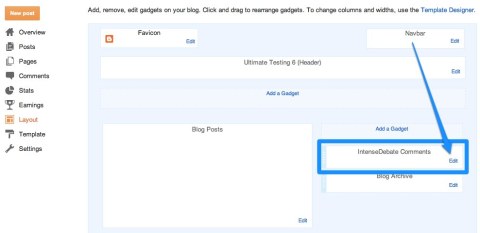
- Select Remove from the edit screen, then select the orange Save arrangement button at the top of the page.

- Next your will need to reinstall IntenseDebate using the Template installation method. To do that go to your Blog Tools tab in your IntenseDebate account. Select Reinstall and follow the installation instructions. You should be all set.
- If you want to switch back to the old Blogger interface, click on the little gear symbol on the right side of the page below your profile picture. Then select the option to switch to the “Old Blogger interface” and you’ll be all set.


Again, we’re here to help. If you come across any issues, you can contact us here. Make sure you include the URL of your blog when you contact us.
We apologize for the inconvenience and appreciate your understanding. For more information about Blogger’s ccTLD redirect change please check out their support documentation here.
Posted by Michael Koenig in Blogger,News
28 Comments »
RSS feed for comments on this post. TrackBack URI
 IntenseDebate - Official Blog
No difference for the custom domain … 🙂
Yes, good point. I will update the post to include that.
However, we would ideally like to discontinue our Widget installation. The Template install is much more stable, and future backend updates will most likely only apply for Template installations.
We realize that it's a pain, but it will be worth it in the long run.
the issue is also not solved after changing to template installation. The earlier comments are also missing!!! It is causing huge issue for me now!!
I replied to your email. We'll get everything sorted out.
Thanks for your patience!
Will I lose all the comments that I have using the old way (widget mode) ?
No, as long as you follow the instructions above, all of your previous comments from your Widget install will still show up. Feel free to contact us with any specific questions related to our site through our contact form so we can better assist.
I switched over to the template installation and everything looks perfect except for one thing. When looking at my homepage there is no longer a comments link (comments #) at the bottom of posts. I went through my ID settings and everything. Any help would be appreciated! 🙂 Thanks!
I replied to your email. Please send in your template using the instructions I sent and we'll take a look.
Thanks!
I have the same problem on mine.
Wow, I’m a Blogger user. I hope nothing happens on my blog :S
I took a look at your site here and your all set – you have installed ID using our Template install. Let me if you have any questions.
For anyone else, the easiest way to determine if you have the Widget or Template install is to go to your Layout tab in your Blogger dashboard, and check if you have the Widget installed in your Gadgets. You can use the instructions that I published in the blog post above.
If you're feeling particularly adventurous you can go to your site and search for our code in your page source. Depending on what the code is, you will be able to determine if you are using the Template or Widget install.
Here's how you can do it:
1. Go to a blog post on your site. We'll use @topjer's site as an example.
2. View the page source for the post. You can do that by right clicking on the post and selecting the option to "View Page Source."
3. When you view the page source, use the search feature in your web browser (usually ctrl + F), and search for "IntenseDebate".
If you have the Widget installed you will see:
< div class ='widget HTML' id='HTML19'><div class='widget-content' ><s cript defer ="defer " type="text/javascript" src= "http://www.intensedebate.com/comment/#################/blogger" >< /script >< / div>
Notice "widget-content." That indicates that it is our Widget installation and not the Template.
If it were the Template installation, then the code snippet would look like this:
< div class='widget Blog' id='Blog1' >
< script src ='http:// http://www.intensedebate .com/js/ bloggerTemplateLinkWrapper.php?acct=################ >< /script >
In that snippet you'll notice "bloggerTemplateLinkWrapper." That indicates that it is a template installation.
Again, this is just a pro-tip and not something you will need to do. The easiest way to figure it out is to go to your Layout page and look for the Widget.
thanks for your explanation michael, it's easy to understand 😉
love this explination and it was easy to see that I am all set.
I wasnt confident in there just 'not being a widget box' on my template page lol
Hey!
I have installed new template yet not able to see my comments. Comments are seen in my mail but not in blogposts.
Please send me your Blogger template as an attached XML file to support [at] intensedebate [dot] com.Also, please send me a couple of links to specific comments that aren't showing up. For information on how to do that please see http://support.intensedebate.com/permalinks/ . Thanks
I sent you mine as well. I've always used the template install, but it quit working about 2 days ago.
Thanks. You should receive a reply soon. We've been a bit backlogged due to this transition and are working our way through all of the support requests. Thanks for your patience – we'll get everything sorted out.
I originally used the template method to install Intense Debate, but had the same problem as Random Deals above. Ramdom Deals said: "I switched over to the template installation and everything looks perfect except for one thing. When looking at my homepage there is no longer a comments link (comments #) at the bottom of posts. I went through my ID settings and everything. Any help would be appreciated! Thanks!"
Ditto for me.
I wrote a message asking for help on this but have not had any response. I have followed all directions above, but a problem remains with some of my recent posts (before reinstalling). Comments are being saved separately so some appear and others not. Here is my site: http://www.thepinesofrome.blogspot.com Could you please help me out with this? Thanks!
Sorry for the delay. We're working our way through all existing support requests and you should receive a response soon. We've been a little backlogged with emails due to this transition.
Thanks for your patience!
Currently we don't offer a way to map comments to a new domain, so that's likely causing the issue. Please email details at support [at] intensedebate [dot] com. Also, please send specific links to the comments in question. We have some great instructions on how to access the comment link and send it to me. Thanks.
I am having a problem that on occasion my intense debate comments disappear and bloggers comments show up instead. So for instance, today I had two people comment using the intense debate comments for a blog post written today, then an hour later I saw that those comments were gone and someone had commented on the post with the blogger comments. I tried reinstalling Intense Debate with no luck, the blogger comments still appear.
I've had this problem before and it comes and goes. Sometimes even the Intense Debate comments come back and replace the Blogger Comments.
Any help would greatly be appreciated!
Thank you for your time.
Blogger introduced a new mobile theme which unfortunately doesn't support IntenseDebate. If you activate the mobile theme that will reactivate Blogger comments. If someone posts a comment using the mobile theme, they will post through Blogger comments which will then override IntenseDebate so it won't load on posts in your normal theme.To prevent this from occurring, please disable your mobile theme in your Blogger admin panel. Sorry for the inconvenience.
I can't uninstall ID since the change – comments are all over the place and not showing on the blog. Have tried repeatedly to uninstall ID and it won't go! 😦
If you are still encountering that issue, can you please send me your template as an attached xml file to support [at] intensedebate.com? I'll take a look.
My apologies for the major delay – your comment slipped through.
I was using the widget, but I've just unistalled it and reinstalled as template version. I don't know if I did something wrong but it's not working =/ I'm afraid to lose all the comments on my blog =/
Should I try to reinstall it again?
If you follow the instructions on this blog post you should be all set! 🙂 If not, please contact us at here and we'll take a look.
Please send me your template as an attached XML file to support [at] intensedebate [dot] com and I'll take a look. Please reference copy/paste your comment in the email so we know what to look for.