31 Mar 2010

WordPress Plugin v2.7 Now Available!

It’s that time again folks: time for another release of our WordPress plugin!

Version 2.7 is available right now in the WordPress Plugin Directory, and you’ll be prompted to upgrade within your WordPress admin panel in the next few hours if you’re already running it. This version brings the following changes:

  • Better loading of JSON libraries: We’ve revised the way that we load JSON (some of the core backend code used in syncing your comments!) so data sync should be much more reliable across more server configurations. Everyone should definitely upgrade for this one!
  • Basic diagnostics to help people when they’re getting started: Running IntenseDebate on your own WordPress server requires a connection between our servers and your own. This handy little feature will help you detect if there are problems with that connection.
  • Ability to configure the plugin using a WordPress.com account: We had some clashes between usernames of IntenseDebate users and WordPress.com users, so now you can specify which type of account you’re using to log in.
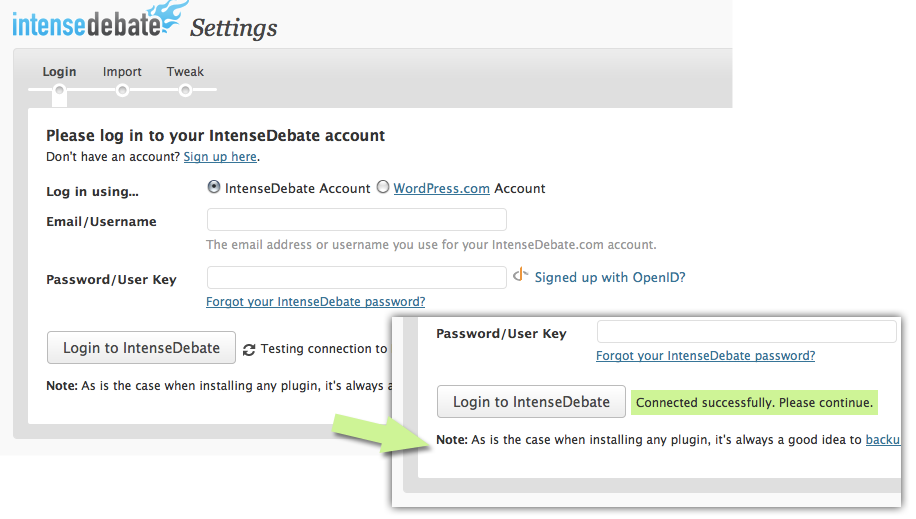
If you’ve had any trouble with a previous version, or were thinking about giving IntenseDebate a try, now’s a perfect time! Install directly through your WordPress admin panel: select Plugins > Add New menu option, or sign up now and follow the prompts.

Posted by Beau Lebens in WordPress Plugin

27 Mar 2010

Localization Update: Right-To-Left Text and 9 New Translations

At long last the wait for Right-To-Left text in IntenseDebate is over!  We’re also stoked to introduce 9 new translations for your comment section. Without further ado, here are our new languages and the awesome folks who translated them:

Hats off to all of our volunteers for their hard work, and many thanks to Yoav and Beau for their work on RTL – it was a major undertaking and we couldn’t have done it without them.

IntenseDebate is now available in 33 languages that are available in your account at http://intensedebate.com/edit-site-account:

Arabic Dutch German Malay Russian Turkish
Bulgarian English Hebrew Norwegian Bokmål Slovak Ukrainian
Catalan Estonian Indonesian Polish Slovene Vietnamese
Croatian Filipino Italian Portuguese (BR) Spanish (LA)
Czech Finnish Japanese Portuguese (PT) Spanish (ES)
Danish French Lithuanian Romanian Swedish

We also have 18 other translations that are nearly ready for prime-time, but we need your help with reviewing them. If you’re interested please send me a note at labs@intensedebate.com.

Afrikaans Chinese Hindi Korean Maltese Swahili
Albanian Galician Hungarian Latvian Persian (Farsi) Tagalog
Belarusian Greek Icelandic Macedonian Serbian Thai

Don’t see your language? Give us a hand!
If you’re interested in getting involved, now is the perfect time. Please email us at labs@intensedebate.com for information. Thanks! 🙂 We’re also going to be updating all of our translations in the near future to keep them up to date with the full set of strings in use on IntenseDebate, so if you helped out previously, keep an eye out for an email soon!

Posted by Michael Koenig in community,features

19 Mar 2010

WordPress.com Auto-Login Temporarily Disabled

UPDATE: WordPress.com Auto-Login is back up and running! Please see http://wp.me/plsX6-IO for details. Thanks for your patience.

We’re making a few changes to how our WordPress.com automatic login feature works on the backend and we have temporarily disabled it.  Users are still able to log in to IntenseDebate manually using their WordPress.com account both at IntenseDebate.com and in the comment sections on your site.  Auto-login will be returning very soon and will work the same as it did before once it’s back.  We apologize for the inconvenience.

Posted by Jon Fox in News

12 Mar 2010

Styling Tip: Moving the Comment Form to the Top

We’ve received a lot of requests recently to move the comment form to the top of the comment section rather than having it at the bottom. We prefer having the comment form at the bottom so your visitors have a chance to catch-up on the debate before posting their comment – that helps cut down on duplicate comments and encourages interaction. But it’s your site and we’re all about customization!

To make it happen, you need to add the following CSS to your Custom CSS page in your IntenseDebate account:

#idc-container-parent #idc-container {
position: relative;
padding-top: 320px;
}

#idc-container-parent #idc-container #IDCommentsNewThreadCover {
position: absolute;
top: 0;
left: 0;
width: 100%;
}

For more CSS help, check out our CSS Documentation and feel free to give us a shout at support@intensedebate.com with any questions. Oh, and don’t forget to check out our other styling tips to simplify your comment section design!

Posted by Michael Koenig in features

11 Mar 2010

New Moderator Role and Comment Voting Option

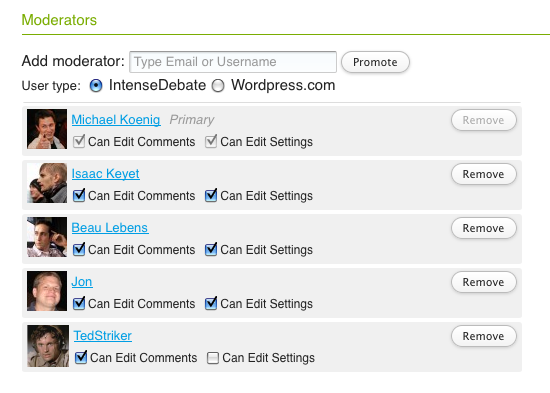
We’re stoked to introduce our new Moderator Role for your blog account.  One of the standard features of IntenseDebate is the option to assign multiple admins to help manage your blog account.  Assigning additional admins would give them full permissions to change your blog account settings and moderate comments.  But we’ve found that sometimes that’s a little too much power to dish out (you know… “with great power comes great responsibility”).

As of today you can keep them all in check.  Now you can promote any IntenseDebate or WordPress.com user to help moderate comments without having to give them full access to your account settings.  You can add additional Moderators and Admins to manage your account in your Moderation Settings page.

Promoting a user as a Moderator will give them access to your Moderation and Comment History pages.  They’ll also be able to remove comments that are out-of-line directly from the comment section. We’ve got some development plans in action to further expand your arsenal of admin features.

Voting
We’ve added a new option for you to disable thumbs-down voting if you want to keep things a little more positive in your comment section. This option is available in your Comment Settings page.

Our goal with this option is to minimize voting bias and the mob mentality that can kick-in when you see a comment in the red. Votes are one of the main factors for user reputation scores, and negative votes can have a major impact on a commenter’s score, especially if they’re brand new to IntenseDebate.

Commenters might also be more likely to give the thumbs-down to users with negative rep scores, so it’s even more difficult for them to climb out. We don’t want them to feel defeated and stop commenting, especially if their crime is that they voiced an unpopular opinion on a political blog or news site (which is quite common). We wanted to give admins the option to avoid this.

On the other hand, there are some malicious comments (and commenters) that deserve the negative ratings, so we wanted to still give admins the option to offer the thumbs-down. We hope that you’ll find this helpful in further encouraging conversations.

More updates and additions to come! 🙂

Posted by Michael Koenig in features

Next Page »
This work is licensed under a Creative Commons Attribution-NonCommercial-ShareAlike 2.5 License. | IntenseDebate – Official Blog