12 Mar 2010

Styling Tip: Moving the Comment Form to the Top

We’ve received a lot of requests recently to move the comment form to the top of the comment section rather than having it at the bottom. We prefer having the comment form at the bottom so your visitors have a chance to catch-up on the debate before posting their comment – that helps cut down on duplicate comments and encourages interaction. But it’s your site and we’re all about customization!

To make it happen, you need to add the following CSS to your Custom CSS page in your IntenseDebate account:

#idc-container-parent #idc-container {
position: relative;
padding-top: 320px;
}

#idc-container-parent #idc-container #IDCommentsNewThreadCover {
position: absolute;
top: 0;
left: 0;
width: 100%;
}

For more CSS help, check out our CSS Documentation and feel free to give us a shout at support@intensedebate.com with any questions. Oh, and don’t forget to check out our other styling tips to simplify your comment section design!

Posted by Michael Koenig in features

11 Mar 2010

New Moderator Role and Comment Voting Option

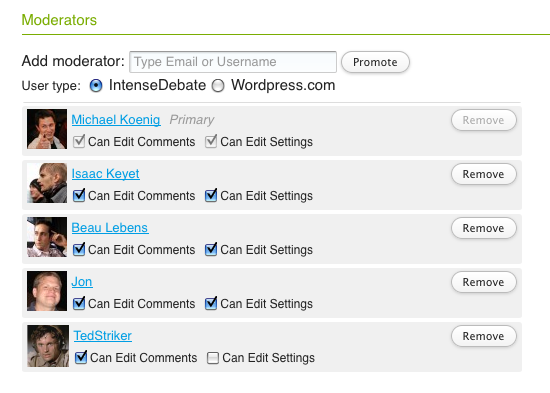
We’re stoked to introduce our new Moderator Role for your blog account.  One of the standard features of IntenseDebate is the option to assign multiple admins to help manage your blog account.  Assigning additional admins would give them full permissions to change your blog account settings and moderate comments.  But we’ve found that sometimes that’s a little too much power to dish out (you know… “with great power comes great responsibility”).

As of today you can keep them all in check.  Now you can promote any IntenseDebate or WordPress.com user to help moderate comments without having to give them full access to your account settings.  You can add additional Moderators and Admins to manage your account in your Moderation Settings page.

Promoting a user as a Moderator will give them access to your Moderation and Comment History pages.  They’ll also be able to remove comments that are out-of-line directly from the comment section. We’ve got some development plans in action to further expand your arsenal of admin features.

Voting
We’ve added a new option for you to disable thumbs-down voting if you want to keep things a little more positive in your comment section. This option is available in your Comment Settings page.

Our goal with this option is to minimize voting bias and the mob mentality that can kick-in when you see a comment in the red. Votes are one of the main factors for user reputation scores, and negative votes can have a major impact on a commenter’s score, especially if they’re brand new to IntenseDebate.

Commenters might also be more likely to give the thumbs-down to users with negative rep scores, so it’s even more difficult for them to climb out. We don’t want them to feel defeated and stop commenting, especially if their crime is that they voiced an unpopular opinion on a political blog or news site (which is quite common). We wanted to give admins the option to avoid this.

On the other hand, there are some malicious comments (and commenters) that deserve the negative ratings, so we wanted to still give admins the option to offer the thumbs-down. We hope that you’ll find this helpful in further encouraging conversations.

More updates and additions to come! 🙂

Posted by Michael Koenig in features

3 Mar 2010

Introducing WordPress.com User Accounts & Auto-Login to IntenseDebate

We are extremely excited to introduce WordPress.com user accounts and auto-login to IntenseDebate and open up the debate to more than 12 million commenters and bloggers.  Now WordPress.com users can comment on IntenseDebate-enabled websites anywhere on the Web without having to re-enter their account information.

While we’ve added Facebook Connect and Twitter Sign-In support, there are still too many steps and mouse clicks between you and posting a comment. We’re all about making commenting easier and more accessible to as many people as possible, and we think you’ll agree that this is a huge leap forward.  Commenting with IntenseDebate is now easier, faster, and simpler.

WordPress.com users post nearly 400,000 new comments every day, and now they are all automatically logged in to comment on your blog. And that’s not to mention the addition of over 20,000 new users every day!

So what does this mean for you?

  • If you’re a WordPress.com user and you’re logged into your account, then you’ll automatically be logged into IntenseDebate as well.  All you have to do is type your comment and hit submit.
  • You can login with your WordPress.com account directly from the comment section and at IntenseDebate.com.
  • If you already have an IntenseDebate account then you can just keep on commenting as normal.

This means that unlike Facebook Connect and Twitter Sign-In, there are no extra clicks, and no need to remember another set of login credentials. It also means that more than 12 million WordPress.com users will be able to comment on your blog with full-fledged IntenseDebate profiles, without having to create an account or enter any details. How’s that for motivating the conversation?

Better yet, since these profiles aren’t third-party accounts, you (and all your new users) will have access to all of the awesome features that IntenseDebate is famous for: email notifications, reply-by-email, reputation scores, comment voting, comment history, Twitter integration, and more.

If you already have both IntenseDebate and WordPress.com accounts, don’t worry – we will be merging your accounts in the next phase of our integration, so keep commenting!

Commenting on your site just got a whole lot easier for millions of existing bloggers and commenters.

Welcome to the debate WordPress.com lovers! 🙂

Posted by Michael Koenig in community,features,News

17 Feb 2010

New Design Customizations: Introducing 16 Button Options

Today we’re excited to announce the addition of not 5, not 10, but 16 new button options for your IntenseDebate comment system. This project has been a long in the making, and these new styles are now available in your Layout Settings page at http://intensedebate.com/edit-site-layout. There are 4 main button styles (apart from the normal text links): Default, Candy, Glass, and Square. Each style features some color and size variations, so you should be able to find something that fits nicely with your site’s theme.

Without further ado, we present the latest from our design labs:
idc-buttons-newbuttons-feb2010-02-16

Default

This is our beloved default button that’s in use across all IntenseDebate comment sections. We’ve introduced a twist with some new size variation: you can choose to only show large buttons.

Candy

Candy is the coolest of the cool when it comes to our new buttons. With 12 different color variations (in common colors ) there’s something for everyone. Our personal favorites include White, Light Blue (which is actually IntenseDebate-blue), Orange, and Green. You’ll actually find a similar button design around IntenseDebate.com – that’s how much we like them!

Glass

Glass is the classy choice. Available in White and Black, it’s a slick alternative to our flashy new Candy buttons. Glass buttons are designed to resemble clear or smoked glass.

Square

For those of you that might want something a bit more square, we now offer a variation to the Default buttons which features small rounded corners. It’s perfect if you don’t want your button too big, or don’t want it to stand out too much.

Head on over to your Blog Layout page to check out the new buttons and activate them.

Posted by Isaac Keyet in features

12 Feb 2010

IntenseDebate Tip: 3 Ways to Subscribe to Comments Via Email

IntenseDebate is feature packed and we’re always adding new bells and whistles. Of course, you know this by now and are likely pretty familiar with our tools. Still there might be some cool features that you never knew existed. We’re guessing that you’re familiar with our email notifications, but there’s one method of subscribing to comments that might be overlooked (I know this because I recently forgot it existed).  This post outlines three methods for commenters to opt to receive email notifications for comments posted.

Subscribe without posting a comment:
This option is located in the RSS menu in the top right of the comment section and is available to everyone: IntenseDebate users, along with commenters posting either as Guests, with Facebook Connect, Twitter Sign-In, or OpenID.  You can opt to receive email notifications for a single post or for comments on all posts.

Subscribe when posting a comment:
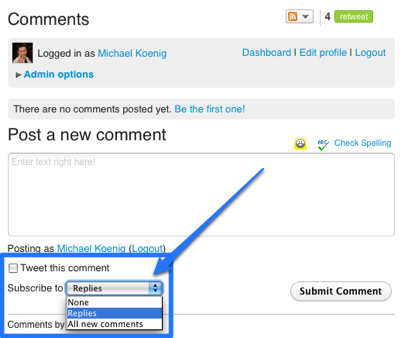
When you post your comment you can opt to receive email notifications for all comments or just for replies to your own.  This option is available to all commenters (IntenseDebate accounts, Facebook Connect, Twitter Sign-In, OpenID, and Guests).

Subscribe automatically (for IntenseDebate users only):
This option is enabled by default for all IntenseDebate users.  You can configure your settings at http://intensedebate.com/edit-user-account.

More tips to come! 😉

Posted by Michael Koenig in features

« Previous PageNext Page »
This work is licensed under a Creative Commons Attribution-NonCommercial-ShareAlike 2.5 License. | IntenseDebate – Official Blog