We’ve begun a limited roll-out of Facebook Connect. Leave a comment if you’re interested in getting in on the early action, and we’ll email you with some instructions. Don’t worry if you don’t hear from us immediately, we’ll get you in on the Facebook Connect goodness as soon as we can.
Facebook Connect will be available for everyone soon!
Thanks!
Update – Thursday, March 26
Thanks everyone for your interest in Facebook Connect. We’re still rolling it out slowly. If you haven’t heard from us yet please hang in there. Thanks again for your patience and help!
Update – Tuesday, July 7
Facebook Connect is now live and available for everyone! Please check out this post for more information. Thanks!
We’re kicking off a new series of blog posts that will reveiw some of our features that you might not know about. The first post in this series will review our moderation and blacklisting settings. Our moderation page is going through a redesign right now, but this will get you off the ground and familiar with our current settings.
Moderation & Blacklisting Filters
IntenseDebate offers some truly hardcore moderation and blacklisting settings. Get the most out of our service and let us do the work of weeding out comments that are out-of-line with our automatic filters. You can automagically hold comments for your approval or have them deleted by:
Keyword
Number of links in the comment
Email address of the commenter
IP address
Enabling these settings is easy. Just login to your account and select the “Settings” tab. You’ll find several text boxes on the left side of the page where you can enter in all of the above info. Make sure you separate your entries with spaces only! You can access the IP addresses in your comment notification emails.
Comment Posting Settings
We offer some additional comment posting settings to help you weed out the rubbish. With IntenseDebate you can require:
All commenters to signup with IntenseDebate before posting*
Commenters must have a previously approved comment*
All comments are held for moderation before they are displayed*
Or none of the above! (default setting)
*Disabled by default
Akismet Filtering
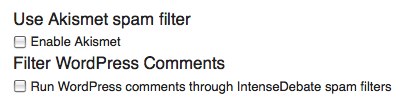
Don’t forget about our Akismet integration! Your IntenseDebate account provides you with the option to run all comments through our cusotm Akismet integration. You can enable Akismet filtering in your Settings panel.
IntenseDebate experienced some unplanned downtime earlier this evening. We have identified and corrected the issue and we’re back up. We’re happy to be back on schedule to deliver our next latest and greatest.
We’re extremely excited to introduce you to the future of commenting – today we launch IntenseDebate Plugins! We’re opening our doors and making our code available so you can build your own plugins!
We’re kicking it off in style by launching a few plugins of our own to demonstrate the possibilities:
PollDaddy: We love our fellow Automattic company and you should too! Enable our PollDaddy plugin and your readers will be able to create polls right in the comment section. Many thanks to Eoin and Lenny (the real PollDaddy’s) for their help!
Seesmic: We’re excited to be working with the Seesmic crew to provide video comments. Enable our Seesmic plugin and give your readers the ability to record and post video comments.
YouTube: This one was developed by our very own code maestro Jon Fox (the man behind IntenseDebate). Enabling our YouTube plugin provides your commenters with the option to insert their favorite YouTube vids.
Smileys: Hats off to Isaac and Austin on this one. It’s all about self-expression. Add in a 😉 and let everyone know that you’re just being sarcastic and not mean!
So all of you developers and IntenseDebate enthusiasts our there, we welcome you to flex your coding muscles to help shape
IntenseDebate to be the comment system that meets all of your needs. For more information about writing a plugin see our Plugin Resources.
So what does this mean?
There is a brand spanking new Plugins tab in your IntenseDebate dashboard that lists the current plugins available. To activate a plugin just select “Activate” next to the plugin when you are logged into your account. Check out the comment section on your blog and you’ll find a plugin icon at the top right of the comment box. To use the plugin just select the icon and you’ll be ready to roll.
For more information check out our Plugins video and enjoy the soothing voice of our esteemed colleague, Michael Pick. We’d love it if you helped spread the word, so please grab the embed code and publish a post about our sweet new plugins!
Kudos to Jon, Isaac, Austin, MT, Michael Pick, Eoin, Lenny, and the Seesmic team for all of the help!
We know we’ve been a little quiet lately – we’ve been hard at work in the lab. We’ve given the IntenseDebate back-end a huge overhaul, making IntenseDebate more scalable and stable than ever. Now we’ve set our sights on optimizing your commenting experience – exciting improvements are on the way!
We’re kicking it off with swanky new public profile pages to put the focus on your comments and make it easier to interact with them! Ooh, and we’re bringing Polaroid pictures back. 😉
So what’s new?
Comment Search: Find specific comments that you’ve made.
Full Comment History: Keep track of every single comment you’ve made.
Overview: Get a quick overview of a fellow commenter with some stats and other profile goodness.
Description + Latest Tweet: Before you had to choose one…now you can have both.
Avatar Quilt: See who I’m following.
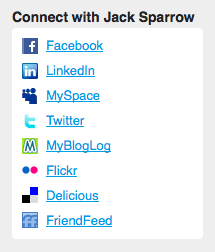
Connect Across the Web: Check out my other online properties.
Check out your profile and select “View your profile as others see it”.







 Seesmic: We’re excited to be working with the Seesmic crew to provide video comments. Enable our Seesmic plugin and give your readers the ability to record and post video comments.

 We know we’ve been a little quiet lately – we’ve been hard at work in the lab. We’ve given the IntenseDebate back-end a huge overhaul, making IntenseDebate more scalable and stable than ever. Now we’ve set our sights on optimizing your commenting experience – exciting improvements are on the way!




 IntenseDebate - Official Blog