10
Nov
2009
A little while back we opened up IntenseDebate for localization, and we received over 100 volunteers to help translate IntenseDebate to 43 languages. Within a couple of weeks we were able to launch translations for 11 languages: Arabic, Croatian, Filipino, French, German, Malay, Brazilian Portuguese, Russian, Latin American Spanish, European Spanish, and Ukrainian. This week we’re excited to release 6 additional translations.
Here are the new languages that we’re releasing, along with the awesome folks who contributed to each translation:
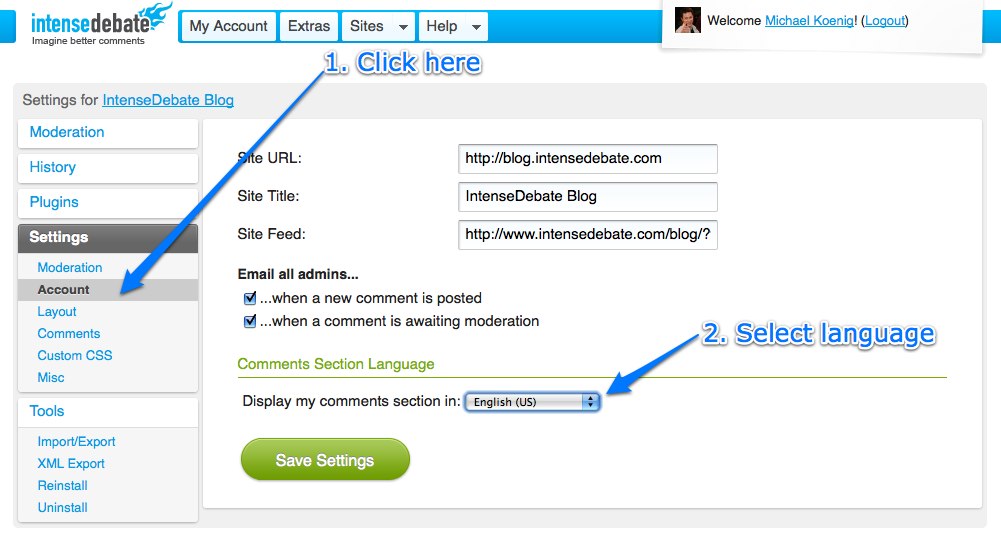
These translations are available in your Blog Settings page at IntenseDebate.com.
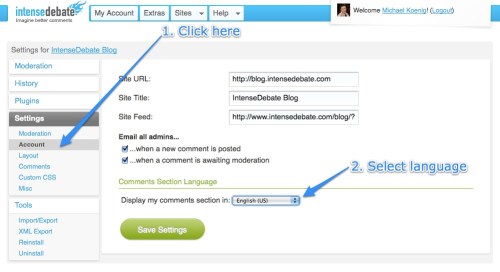
We’re looking forward to making more translations available for use as they continue to get completed. So far we’ve received volunteers to help translate these additional languages:
| Azeri |
Hungarian |
Portuguese (European) |
| Bahasa Indonesia |
Indonesian |
Romanian |
| Chinese |
Japanese |
Serbian |
| Czech |
Korean |
Swedish |
| Danish |
Maldives |
Romanian |
| Dutch |
Norwegian |
Turkish |
| Galician |
Persian |
| Hebrew |
Polish |
|
|
|
Don’t see your language? Give us a hand!
If you’re interested in getting involved, now is the perfect time! Please email us at labs@intensedebate.com for information. Ideally we’d like to have at least two Iñtërnâtiônàlizætiønër’s working together for each translation. Thanks!
Posted by Michael Koenig in community,features
2
Nov
2009
There are loads of interesting debates happening across the IntenseDebate network. One of our goals is to highlight those conversations so you can check them out and add your own two cents. We’re all about content discovery, and we’re always looking for new ways to do this.
We are kicking off a new series of blog entries that feature cool debates and blog posts taking place across the IntenseDebate network, and we would love your help. Leave us a comment and let us know about interesting conversations and posts that you’ve come across or participated in. If it’s super-cool we’ll feature it right here on our blog and give it some link-love.
Here’s how you can get involved:
- Keep an eye out for interesting conversations and cool blog posts as you cruise around the interweb.
- Grab the comment permalink or blog post link (instructions below), paste it in a comment below, and let us know why you dig it.
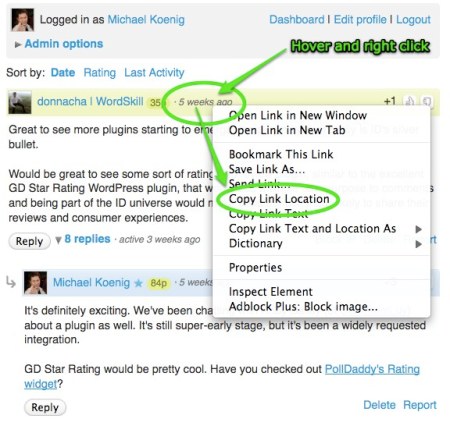
Grabbing a permalink:
- Locate the timestamp for the comment (formatted as “10 minutes ago”)
- Hover your mouse cursor over the timestamp and right-click with your mouse.
- Depending on which web browser you’re using, there will be an option to “Copy Link Location” or “Copy Link”.
- Select that, and then paste it in your comment below.
Thanks for your help!
Posted by Michael Koenig in feedback
24
Oct
2009
This is the first in a series of articles which will hopefully inspire and help you style the IntenseDebate comment system so it fits better with your blog. We’ve reached a point in IntenseDebate’s history where the basic HTML and CSS classes the comment system is built on is solid, so now you should be able to style it more than ever, without fear of your new styles breaking in future updates.
Styling IntenseDebate: Simplify comment design
If you have a really clean and simple blog, you might find IntenseDebate’s pretty glossy comment headers and rounded corners a bit too much. With just a few simple CSS rules, you can alter the comment header to your own liking. In this tutorial we’ll be modifying the .idc-c-h element, which is “ID language” for “.IntenseDebateComments-Comment-Header”.
How to use this guide
All styles can be added either to your “Custom CSS” box in your IntenseDebate admin panel (recommended, go to Settings>Custom CSS) or directly to your blogs/sites stylesheet.
- First, we’ll remove the normal background from the comment headers, apply a top border and make sure the padding and margins look good.
#idc-container-parent #idc-container .idc-c-h {

background: none;

border-top: 1px solid #ddd;

padding: 3px 0 0;

}
Background: none; means we’ve removed the normal background image. If you instead want a light gray background, you could try background: #f6f6f6;!
- Next, we’ll remove the spacing around the comment elements that make it not align with our new pretty top border. If you add in these CSS elements, you should know how all of the comment contents perfectly aligned with the top border:
#idc-container-parent #idc-container .idc-c-h-inner {

margin: 0;

}
#idc-container-parent #idc-container .idc-c-t,
#idc-container-parent #idc-container .idc-c-b {
margin-left: 0;
margin-right: 0;
}
#idc-container-parent #idc-container .idc-c-b .idc-btn_s {
margin-left: 0 !important;
}
- Lastly, if you still want a special look for the comments posted by an admin, we can apply a special styling to admin comments by using the class
.idc-c.idc-admin this class is used for all admin comments posted on your blog.
#idc-container-parent #idc-container .idc-c.idc-admin .idc-c-h {

border-top-color: #c00;

}
This style will exchange the light gray border we just added for a very fashionable dark red shade.
Tips on styling IntenseDebate:
- When you want to start styling IntenseDebate, and need to know what the elements in the comment system are called, we highly recommend FireBug, a developer extension for Firefox. Using the Inspect feature, you can just click the element you want to style, and it will bring up all the CSS associated by it, including what the element’s CSS class is. Pretty handy!
- Look up the element you want to style, for instance
.idc-c-h and then apply #idc-container-parent to the rule when you write the CSS. In this example, you would write #idc-container-parent #idc-container .idc-c-h to style .idc-c-h, the comment header.
- Put your new CSS rules in the Custom CSS box in your IntenseDebate admin panel, located at Settings>Custom CSS.
Make sure you check out our CSS Documentation for a complete list of elements you can style in IntenseDebate with tips on how to modify them, and feel free to let us know if you have any questions. Until next time!
Posted by Isaac Keyet in features
21
Oct
2009
Bonjour! We spent last week in Quebec with our fellow Automattic colleagues for our annual company meetup, and we had an amazing time. This was the first time Jon, Isaac, Beau, and I have been in the same room, so it was a pleasure to work side-by-side and kick around some ideas together.

We also got the chance to collaborate with the rest of the Automattic crew to look at how IntenseDebate can integrate with other Automattic projects, and learn how to apply their scaling knowledge to our systems.
While some of the projects aren’t ready to be disclosed yet, here are some general details about what we’re working on (please note that these include long-term projects):
- Backend Loading Optimization: We’re really excited about this project. We are currently working on a new method for optimizing how we load comments and trackbacks. This will improve load times even as the volume of comments on your blog continues to increase, as well as correct a couple of bugs. Loading IntenseDebate will be even more seamless!
- More Sync Improvements: We had the opportunity to pick the brains of our brilliant WordPress system engineers about the inner-workings of WordPress. We will be adapting some of the code and principles they use to improve the quality of our syncing engine. This is going to be huge for our plugin and will correct those pesky sync discrepancies that have been floating around affecting comment counts and backups.
- WordPress Plugin Overhaul: The core of our WordPress plugin was written prior to joining Automattic. Since then our understanding of the WordPress codebase has drastically improved. We have now identified significant portions of the plugin code that can be simplified or optimized making it much more lightweight and perform better. The principles that we are applying in this overhaul will eventually be applied to our integrations with other platforms across the board.
- Moderation, Moderation, Moderation! Bug fixes aside, optimizing moderation is high priority. The main moderation project that we’re currently working on is reworking your moderation page. We will be minimizing the time you spend moderating comments and filtering spam, and simplifying your user experience.
- Support Documentation and Forums: We’re beefing-up our FAQ and support resources for end users, publishers and developers. This will help everyone to find the answers they’re looking for. More info to come on this one soon.
It’s an exciting time here at IntenseDebate! We’re looking forward to pushing out loads of new code, and we will be depending on you for your feedback. Keep an eye right here on our blog for the latest news.
Posted by Michael Koenig in News,WordPress Plugin
9
Oct
2009
As Matt mentioned in the September Wrap-Up, we are heading to Québec City with the rest of the Automattic crew for our biannual meetup to work on some top-secret projects.
Here at Automattic we are spread across the world, and are in a sense a distributed company. For instance, Beau is located in San Fransisco, CA; Jon is in Boulder, CO; I’m in Chicago, IL; and Isaac is in Veddige, Sweden. So we relish the opportunity to get together to kick-it, toss around some ideas, and collaborate with the rest of the Automattic team.
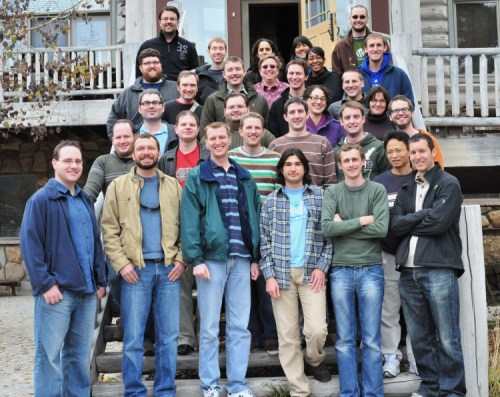
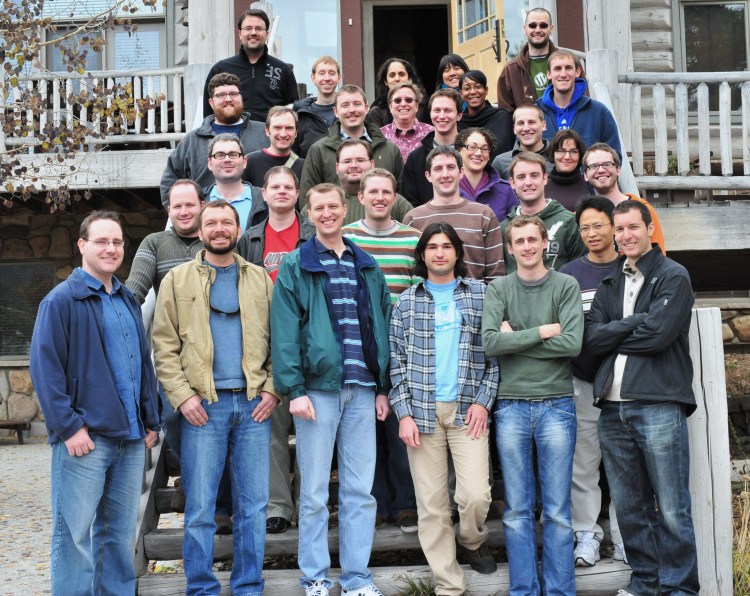
Past meetups have yielded some super-cool features and enhancements for IntenseDebate like our PollDaddy Polls plugin, Gravatar integration, localization, backend integration, and some top-secret projects that are still underway. We’ve also contributed to WordPress.com features like Reply-By-Email which was a product of our time with the Automattic crew last October in Breckenridge, Colorado (picture below).
The Automattic family has grown since our last meetup so we’re excited to have the opportunity to meet and trade ideas with our newest colleagues. With that in mind, while support will still be readily available and answered daily, please allow for some extra-time in the upcoming week as we might take slightly longer to respond. We greatly appreciate your patience.
You can expect great things to come!
Posted by Michael Koenig in News




 IntenseDebate - Official Blog