17 Feb 2010

New Design Customizations: Introducing 16 Button Options

Today we’re excited to announce the addition of not 5, not 10, but 16 new button options for your IntenseDebate comment system. This project has been a long in the making, and these new styles are now available in your Layout Settings page at http://intensedebate.com/edit-site-layout. There are 4 main button styles (apart from the normal text links): Default, Candy, Glass, and Square. Each style features some color and size variations, so you should be able to find something that fits nicely with your site’s theme.

Without further ado, we present the latest from our design labs:
idc-buttons-newbuttons-feb2010-02-16

Default

This is our beloved default button that’s in use across all IntenseDebate comment sections. We’ve introduced a twist with some new size variation: you can choose to only show large buttons.

Candy

Candy is the coolest of the cool when it comes to our new buttons. With 12 different color variations (in common colors ) there’s something for everyone. Our personal favorites include White, Light Blue (which is actually IntenseDebate-blue), Orange, and Green. You’ll actually find a similar button design around IntenseDebate.com – that’s how much we like them!

Glass

Glass is the classy choice. Available in White and Black, it’s a slick alternative to our flashy new Candy buttons. Glass buttons are designed to resemble clear or smoked glass.

Square

For those of you that might want something a bit more square, we now offer a variation to the Default buttons which features small rounded corners. It’s perfect if you don’t want your button too big, or don’t want it to stand out too much.

Head on over to your Blog Layout page to check out the new buttons and activate them.

Posted by Isaac Keyet in features

12 Feb 2010

IntenseDebate Tip: 3 Ways to Subscribe to Comments Via Email

IntenseDebate is feature packed and we’re always adding new bells and whistles. Of course, you know this by now and are likely pretty familiar with our tools. Still there might be some cool features that you never knew existed. We’re guessing that you’re familiar with our email notifications, but there’s one method of subscribing to comments that might be overlooked (I know this because I recently forgot it existed).  This post outlines three methods for commenters to opt to receive email notifications for comments posted.

Subscribe without posting a comment:
This option is located in the RSS menu in the top right of the comment section and is available to everyone: IntenseDebate users, along with commenters posting either as Guests, with Facebook Connect, Twitter Sign-In, or OpenID.  You can opt to receive email notifications for a single post or for comments on all posts.

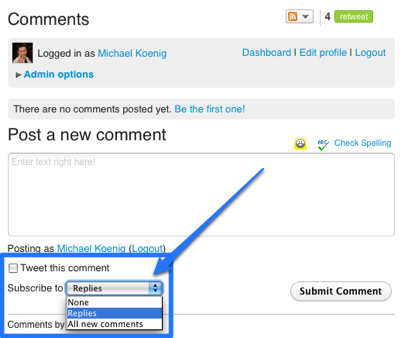
Subscribe when posting a comment:
When you post your comment you can opt to receive email notifications for all comments or just for replies to your own.  This option is available to all commenters (IntenseDebate accounts, Facebook Connect, Twitter Sign-In, OpenID, and Guests).

Subscribe automatically (for IntenseDebate users only):
This option is enabled by default for all IntenseDebate users.  You can configure your settings at http://intensedebate.com/edit-user-account.

More tips to come! 😉

Posted by Michael Koenig in features

11 Feb 2010

Hot Off the Press: Google Buzz IntenseDebate Plugin

Introducing Jon’s latest creation (he wrote it over lunch today!): the shiny new Google Buzz IntenseDebate Plugin.

In case you’re not familiar with it, Google Buzz is the latest creation from Google Labs and is built into your Gmail interface.  Per Google:

Go beyond status messages
Share updates, photos, videos, and more.
Start conversations about the things you find interesting.

Our Google Buzz Plugin gives you the option to share a blog post right through your IntenseDebate comment section. Just select the “Buzz It” icon at the top right of the comment section login to your Google Account add a messagehit submit and you’ve buzzed.

Please note: in order for it to work properly your Buzz account needs to be setup.

You can enable it in your Plugins Directory at http://intensedebate.com/plugins.

Like all IntenseDebate plugins, adding advanced features to your comment section is a piece of cake: just visit your Plugins Page at http://intensedebate.com/plugins, and select “Activate” next to the plugin. That’s all! There’s no additional code for you to manually install, so there’s no need to get your hands dirty messing around with your template.

Interested in flexing your own coding muscles and developing a super-slick plugin? Check out our Plugin Resources and documentation. You can also check out our Plugins blog post for more information.

Posted by Michael Koenig in features

16 Jan 2010

Moderation Whitelist and User Profile Update

Nothing ruins a vibrant comment thread faster than a link to buy cheap Xanax and play online poker at a porn site. Even worse is the friendly spam that can sometimes slip through – you know, it says “great site, I’ll be subscribing to your blog” but it’s really a link to a spammy website.  With that in mind, we’re doing some major work on our backend to improve the IntenseDebate spam filters and Akismet integration.

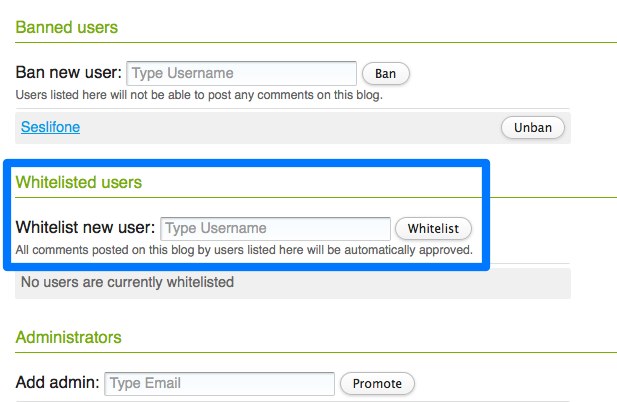
While there’s still work to be done, the good news is that we’re making excellent progress to improve the effectiveness of our filters. The not-so-good news is that our filters are sometimes too strict, and legitimate commenters are flagged as spam. This is happening because either the user’s past comments have been marked as spam, or their comments are confused as friendly spam. While we’re working to correct this issue, we’ve added a User Whitelist to serve as an immediate fix.  Adding a user to your whitelist will automatically approve all of their comments.

Your User Whitelist is located in your Moderation Settings Page at http://intensedebate.com/edit-site-moderation. To add a user to the whitelist, just type in their username and select the “Whitelist” button. Then make sure to click the save button at the bottom of the page.

User Profile Update
We’ve also made a minor change to the display name links in the comment section.  If you have added a blog or website to your IntenseDebate profile, your display name will now link to that instead of to your IntenseDebate profile page. If you haven’t added your blog or website to your profile, you can add it at http://intensedebate.com/editprofile.

Don’t have a blog or website? Don’t worry! Your display name will link to your IntenseDebate profile. You can still access IntenseDebate profiles by selecting “View IntenseDebate Profile” when you hover over an avatar. This was a popular request so we’re happy to provide this update!

Posted by Michael Koenig in features

11 Jan 2010

Localization Update: 22 New Translations Need Your Review

Exciting news!  We have 22 newly translated languages that are nearly ready for prime-time, but we need your help.  We used a Google Translate tool to generate them, and we’re looking for volunteers to review these translations for any grammatical and contextual errors.  If you’re interested, please email us at labs@intensedebate.com and we’ll send you the translation along with some instructions. Thanks!

Translations to be reviewed:

Afrikaans Finnish Hungarian Latvian Portuguese (PT) Tagalog
Albanian Galician Icelandic Macedonian Romanian Thai
Belarusian Greek Indonesian Maltese Serbian
Chinese Hindi Korean Persian Swahili

We offer 24 translations that are currently available in your account at http://intensedebate.com/edit-site-account:

Arabic Czech Filipino Lithuanian Russian Spanish (ES)
Bulgarian Danish French Malay Slovak Swedish
Catalan English German Polish Slovene Turkish
Croatian Estonian Italian Portuguese (BR) Spanish (LA) Ukrainian

And we have a few translations that are nearing completion: Dutch, Hebrew, Japanese, Norwegian Bokmål, and Vietnamese.

Don’t see your language? Give us a hand!
If you’re interested in getting involved, now is the perfect time! Please email us at labs@intensedebate.com for information. Thanks!

Posted by Michael Koenig in community,features

« Previous PageNext Page »
This work is licensed under a Creative Commons Attribution-NonCommercial-ShareAlike 2.5 License. | IntenseDebate – Official Blog