When you’re on a roll, you’re on a roll! We’ve got two new admin features to introduce today: Ban Users & View Deleted Comments.
Banning Users
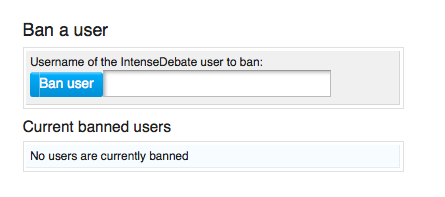
This just got a whole lot easier. If you recall, before you could only ban users from the moderation page when their comments were flagged. Take a look at your blog Settings page in your IntenseDebate profile. At the bottom right there’s a brand new section where you can input a username to ban that user from commenting. We think you’ll agree: this is a big improvement from having to either ban the user by email, IP, or add their username as a keyword.
View Deleted Comments
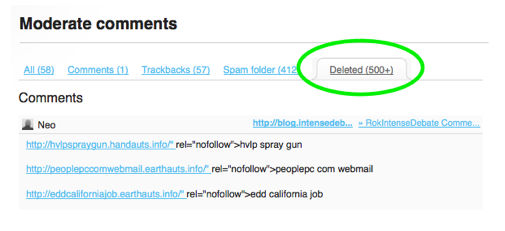
Until now deleted comments were gone forever! Now you can view all comments that have been deleted from your blog. This will come in handy if you’ve got an itchy trigger finger and tend to delete comments by accident. Now you can undelete them! Check out your Moderation page and you’ll see a shiny new Deleted Comments tab. This tab includes all comments that hit your blacklists in addition to comments that you deleted.
We’ve got some more cool projects in the works, so if you haven’t given IntenseDebate a try yet, there’s no better time than now! Get started with IntenseDebate.
Last Saturday we introduced Twitter Sign-In to IntenseDebate, and within a couple of hours it was activated on a massive number of sites! We decided that with that kind of adoption we had better build the next step for Twitter integration: Tweet This for Twitter Sign-In users.
Back in June, 2008 we introduced Tweet This for IntenseDebate users, and we received plenty of requests to add this for Twitter Sign-In users. Well, ask and you shall receive! Commenters using their Twitter account can now opt to send a simultaneous tweet when they post a comment by selecting the Tweet This checkbox when they post a comment. You can enable Twitter Sign-in in your Blog Settings page at http://intensedebate.com/edit-site-comments. Facebook Connect is also available through your Blog Settings page. Please see http://wp.me/plsX6-go for more details about Facebook Connect.
Next up we’d like to introduce a new admin moderation feature: Auto-approve commenters by reputation score. By setting a minimum reputation score for commenters, you can ensure that comments submitted by your regular readers will always be approved and not flagged for moderation. This is an excellent way to make sure that the debate doesn’t get interrupted by moderation. This feature is located on the left in your blog settings page of your IntenseDebate account. To enable it just type in a minimum reputation score and any user with that score or higher will be able to comment freely.
Last up, we’ve rolled out a bug fix for the email notification issue that some of you may have encountered. We received reports of instances where email notifications for new comments were not being received. We have since identified and corrected the problem, so this shouldn’t be an issue anymore. However, if you do encounter this please let us know by emailing support.
The Pipeline
We are continuing to work on a couple of niche bug fixes, and should have the remaining issues squashed out soon. In addition, we’re working on a few projects that are coming soon…
Admin comment editing – the top requested admin feature in our last poll
Version 2.4 of our WordPress plugin (details coming soon)
Additional performance optimizations
As always, if you haven’t given IntenseDebate a try yet, there’s no better time than now! Get started with IntenseDebate.
A little while ago we asked for your feedback on what you like about IntenseDebate and what you’d like to see moving forward. Of the survey results we received, Twitter Sign-in is the most requested feature with 52.3% of the vote. Localization came in second with 30.9% and Google Friend Connect in third with 16.8%.
With that in mind, we’re excited to introduce Twitter Sign-in integration with IntenseDebate! Now when you enable Twitter Sign-in, your readers will have the option to leave a comment using their Twitter login info. This feature is located in your Blog Settings tab in your IntenseDebate account.
To enable Twitter Sign-in login > select the tab named after your site > select the Settings tab > Twitter Sign-in is located just above Facebook Connect at the bottom left.
We received some excellent feedback on other ways to improve IntenseDebate (aside from localization and Google Friend Connect). Below are the top 3 additional admin feature requests we received. While we’re currently setting our sights on finishing up some other projects, we’re interested in what you think about these ideas. Your input is greatly appreciated. Please take a moment and choose the feature that you think would be most useful. Thanks!
Facebook Connect integration for your IntenseDebate comment section is now up, running, and open for business! We’ve worked with the Facebook team to tighten up the integration and make it as slick as possible in true IntenseDebate style.
To enable Facebook Connect in your IntenseDebate comment section please visit your blog Settings page in your IntenseDebate account at http://intensedebate.com/edit-site-comments. Please follow the instructions and you’ll be all set!
We have also added the option to share your comments on Facebook. Please see http://wp.me/plsX6-qD for more details. And don’t forget to check out Twitter Sign-in for your comments.
We’re trying some new things on our end, and we’d like to get you in on it. As we continue to optimize our backend and UI, we’d like to get your feedback on what you’d like to see in IntenseDebate. We value your opinion and we want to develop features that you want, so let us know (it’s so much easier than guessing!). 😉
We will be announcing Facebook Connect integration shortly (we’re ironing out FBC & Safari 4 integration), so please don’t request it because it’s right around the corner.
We’ve put together a PollDaddy survey and we’d love it if you took a minute to give us some feedback. Many thanks!





 Facebook Connect integration for your IntenseDebate comment section is now up, running, and open for business! We’ve worked with the Facebook team to tighten up the integration and make it as slick as possible in true IntenseDebate style.
 IntenseDebate - Official Blog