Well, it looks like we might have overdone it a bit and built in too many awesome features. We remembered that sometimes simple is better. With that in mind, we’re proud to introduce an array of new customization options for your comment section.
If you visit your blog account at IntenseDebate.com you’ll notice a shiny new “Customize” tab. Now you can choose which specific components you want to display in your comment section including, the Login Button at the top right, the RSS tab, OpenID, and comment voting (to name a few). So if you’re going for a clean and simple comment section, you can whittle IntenseDebate down to the basics.
We’re interested in your feedback! What else would you like to be able to remove?
Please note: we’re aware of the demand for localization – it’s something that we’re working on, so there’s no need to request it.
If you’re not hip yet and haven’t given IntenseDebate a try, then what are you waiting for? Get started already!
Last Saturday we introduced Twitter Sign-In to IntenseDebate, and within a couple of hours it was activated on a massive number of sites! We decided that with that kind of adoption we had better build the next step for Twitter integration: Tweet This for Twitter Sign-In users.
Back in June, 2008 we introduced Tweet This for IntenseDebate users, and we received plenty of requests to add this for Twitter Sign-In users. Well, ask and you shall receive! Commenters using their Twitter account can now opt to send a simultaneous tweet when they post a comment by selecting the Tweet This checkbox when they post a comment. You can enable Twitter Sign-in in your Blog Settings page at http://intensedebate.com/edit-site-comments. Facebook Connect is also available through your Blog Settings page. Please see http://wp.me/plsX6-go for more details about Facebook Connect.
Next up we’d like to introduce a new admin moderation feature: Auto-approve commenters by reputation score. By setting a minimum reputation score for commenters, you can ensure that comments submitted by your regular readers will always be approved and not flagged for moderation. This is an excellent way to make sure that the debate doesn’t get interrupted by moderation. This feature is located on the left in your blog settings page of your IntenseDebate account. To enable it just type in a minimum reputation score and any user with that score or higher will be able to comment freely.
Last up, we’ve rolled out a bug fix for the email notification issue that some of you may have encountered. We received reports of instances where email notifications for new comments were not being received. We have since identified and corrected the problem, so this shouldn’t be an issue anymore. However, if you do encounter this please let us know by emailing support.
The Pipeline
We are continuing to work on a couple of niche bug fixes, and should have the remaining issues squashed out soon. In addition, we’re working on a few projects that are coming soon…
Admin comment editing – the top requested admin feature in our last poll
Version 2.4 of our WordPress plugin (details coming soon)
Additional performance optimizations
As always, if you haven’t given IntenseDebate a try yet, there’s no better time than now! Get started with IntenseDebate.
Facebook Connect integration for your IntenseDebate comment section is now up, running, and open for business! We’ve worked with the Facebook team to tighten up the integration and make it as slick as possible in true IntenseDebate style.
To enable Facebook Connect in your IntenseDebate comment section please visit your blog Settings page in your IntenseDebate account at http://intensedebate.com/edit-site-comments. Please follow the instructions and you’ll be all set!
We have also added the option to share your comments on Facebook. Please see http://wp.me/plsX6-qD for more details. And don’t forget to check out Twitter Sign-in for your comments.
We’ve rolled out some cool changes to your User Menu! Ever notice that when you hover your mouse cursor over a user’s profile picture, their User Menu drops down displaying links to their profile, blogs, and more? Well the User Menus just got a whole lot more useful!
Not only do they look super-sweet, they also present higher quality info right up front, while minimizing the footprint. Now you can quickly learn about your fellow commenters. We’ve got some more changes to the comment section coming soon.
So what’s new in the User Menu?
Profile Picture now blows-up so you can get a good look at it.
Reputation Score is included.
User Description & Latest Tweet are both there so you don’t have to choose one or the other.
Slick New Look
So now when you hover her avatar you’ll get a better look at miss Swann and learn more about her all at the same time! Not too shabby!
We’re extremely excited to introduce you to the future of commenting – today we launch IntenseDebate Plugins! We’re opening our doors and making our code available so you can build your own plugins!
We’re kicking it off in style by launching a few plugins of our own to demonstrate the possibilities:
PollDaddy: We love our fellow Automattic company and you should too! Enable our PollDaddy plugin and your readers will be able to create polls right in the comment section. Many thanks to Eoin and Lenny (the real PollDaddy’s) for their help!
Seesmic: We’re excited to be working with the Seesmic crew to provide video comments. Enable our Seesmic plugin and give your readers the ability to record and post video comments.
YouTube: This one was developed by our very own code maestro Jon Fox (the man behind IntenseDebate). Enabling our YouTube plugin provides your commenters with the option to insert their favorite YouTube vids.
Smileys: Hats off to Isaac and Austin on this one. It’s all about self-expression. Add in a 😉 and let everyone know that you’re just being sarcastic and not mean!
So all of you developers and IntenseDebate enthusiasts our there, we welcome you to flex your coding muscles to help shape
IntenseDebate to be the comment system that meets all of your needs. For more information about writing a plugin see our Plugin Resources.
So what does this mean?
There is a brand spanking new Plugins tab in your IntenseDebate dashboard that lists the current plugins available. To activate a plugin just select “Activate” next to the plugin when you are logged into your account. Check out the comment section on your blog and you’ll find a plugin icon at the top right of the comment box. To use the plugin just select the icon and you’ll be ready to roll.
For more information check out our Plugins video and enjoy the soothing voice of our esteemed colleague, Michael Pick. We’d love it if you helped spread the word, so please grab the embed code and publish a post about our sweet new plugins!
Kudos to Jon, Isaac, Austin, MT, Michael Pick, Eoin, Lenny, and the Seesmic team for all of the help!




 Facebook Connect integration for your IntenseDebate comment section is now up, running, and open for business! We’ve worked with the Facebook team to tighten up the integration and make it as slick as possible in true IntenseDebate style.
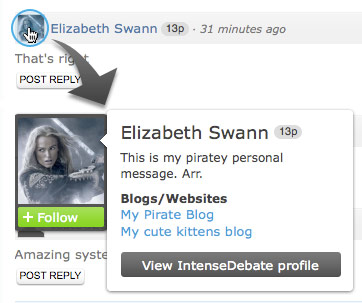 We’ve rolled out some cool changes to your User Menu! Ever notice that when you hover your mouse cursor over a user’s profile picture, their User Menu drops down displaying links to their profile, blogs, and more? Well the User Menus just got a whole lot more useful!

 Seesmic: We’re excited to be working with the Seesmic crew to provide video comments. Enable our Seesmic plugin and give your readers the ability to record and post video comments.

 IntenseDebate - Official Blog