14
May
2009
 Big news! We’re migrating our avatar system over to Gravatar! We’re all part of the Automattic family and Gravatar has it down, so as the saying goes, “why recreate the wheel?” This is going to be a gradual process so don’t panic.
What is a gravatar?
A gravatar, or globally recognized avatar, is quite simply an image that follows you from site to site appearing beside your name when you do things. Avatars help identify your posts on blogs and web forums, so why not on any site?
We’ve rolled out the first steps of this process. We now check to see if you have a gravatar and if you do, we’ll automatically use it. If you are using an IntenseDebate avatar instead of your gravatar then you’ll notice a change (unless your gravatar and IntenseDebate avatar are the same!). Our apologies for the inconvenience.
Next up, you might have noticed the blue message in your IntenseDebate account prompting you to verify your email address. This is to make sure you are who you say you are. 😉 If you haven’t verified your email address yet, please go ahead and do so.
We’ll keep you posted on the next phases of this project. If you haven’t discovered Gravatar yet, check it out and create your own!
Posted by Michael Koenig in features
1
May
2009
We’re excited to introduce two new plugins: AddToAny Share Buttons for both your comments and your posts! Enabling AddToAny Share Buttons lets your readers share, save, bookmark, and email comments using any service, such as Delicious, Digg, Facebook, Twitter, and over 100 more social bookmarking and sharing sites.
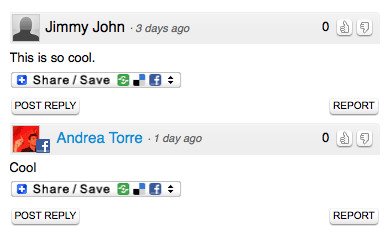
Enable AddToAny Share Buttons on your blog by visiting your Plugins page and select the Activate link next to the plugin. And don’t forget to check out our other plugins like PollDaddy polls, Seesmic video comments, YouTube, and Smileys. The AddToAny Share Buttons plugins were developed by our friend Pat, who helps run AddToAny blog share buttons.
Interested in flexing your own coding muscles and developing a super-sweet plugin? Check out our Plugin Resources and documentation. You can also check out our Plugins blog post to find out more information.
Many thanks to Pat and his team for their phenomenal work and addition to IntenseDebate!
Posted by Michael Koenig in features
24
Apr
2009
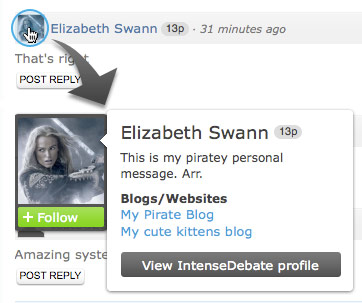 We’ve rolled out some cool changes to your User Menu! Ever notice that when you hover your mouse cursor over a user’s profile picture, their User Menu drops down displaying links to their profile, blogs, and more? Well the User Menus just got a whole lot more useful!
Not only do they look super-sweet, they also present higher quality info right up front, while minimizing the footprint. Now you can quickly learn about your fellow commenters. We’ve got some more changes to the comment section coming soon.
So what’s new in the User Menu?
- Profile Picture now blows-up so you can get a good look at it.
- Reputation Score is included.
- User Description & Latest Tweet are both there so you don’t have to choose one or the other.
- Slick New Look
So now when you hover her avatar you’ll get a better look at miss Swann and learn more about her all at the same time! Not too shabby!
If you haven’t given IntenseDebate a try yet, there’s no better time than now! Get started with IntenseDebate.
Posted by Michael Koenig in features
20
Mar
2009
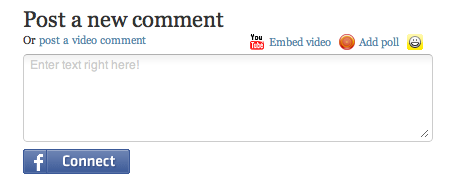
That’s right, Facebook Connect is here!
We’ve begun a limited roll-out of Facebook Connect. Leave a comment if you’re interested in getting in on the early action, and we’ll email you with some instructions. Don’t worry if you don’t hear from us immediately, we’ll get you in on the Facebook Connect goodness as soon as we can.
Facebook Connect will be available for everyone soon!
Thanks!

Update – Thursday, March 26
Thanks everyone for your interest in Facebook Connect. We’re still rolling it out slowly. If you haven’t heard from us yet please hang in there. Thanks again for your patience and help!
Update – Tuesday, July 7
Facebook Connect is now live and available for everyone! Please check out this post for more information. Thanks!
Posted by Michael Koenig in features
13
Mar
2009
We’re kicking off a new series of blog posts that will reveiw some of our features that you might not know about. The first post in this series will review our moderation and blacklisting settings. Our moderation page is going through a redesign right now, but this will get you off the ground and familiar with our current settings.
Moderation & Blacklisting Filters
IntenseDebate offers some truly hardcore moderation and blacklisting settings. Get the most out of our service and let us do the work of weeding out comments that are out-of-line with our automatic filters. You can automagically hold comments for your approval or have them deleted by:
- Keyword
- Number of links in the comment
- Email address of the commenter
- IP address
Enabling these settings is easy. Just login to your account and select the “Settings” tab. You’ll find several text boxes on the left side of the page where you can enter in all of the above info. Make sure you separate your entries with spaces only! You can access the IP addresses in your comment notification emails.
Comment Posting Settings
We offer some additional comment posting settings to help you weed out the rubbish. With IntenseDebate you can require:
- All commenters to signup with IntenseDebate before posting*
- Commenters must have a previously approved comment*
- All comments are held for moderation before they are displayed*
- Or none of the above! (default setting)
*Disabled by default
Akismet Filtering
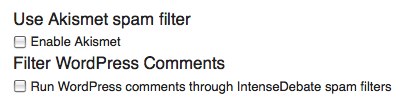
Don’t forget about our Akismet integration! Your IntenseDebate account provides you with the option to run all comments through our cusotm Akismet integration. You can enable Akismet filtering in your Settings panel.
Check out your Settings panel in your IntenseDebate account for more options!
Posted by Michael Koenig in features






 IntenseDebate - Official Blog