12
Nov
2009
Andy Bailey, the code ninja behind CommentLuv, has been working to get CommentLuv integrated with IntenseDebate, and we’re pumped to let you know that the shiny new ID CommentLuv plugin is ready for primetime! CommentLuv has been always been a widely requested feature, and with good reason – it’s the perfect fit for IntenseDebate, and will go a long way in helping strengthen your community. You can check out Andy’s post here.
So what’s CommentLuv?
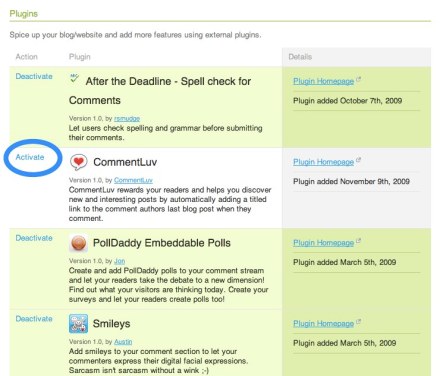
CommentLuv rewards your readers and helps you discover new and interesting posts by automatically adding a titled link to the comment authors last blog post when they comment.
Just like all of our plugins, activating is one simple click of the mouse and you’re done. When you’re logged in, go to http://intensedebate.com/plugins, find the CommentLuv plugin, and hit “Activate”. That’s it! Make sure you check out our other plugins like PollDaddy Polls, After the Deadline spelling and grammar checker, and loads more.
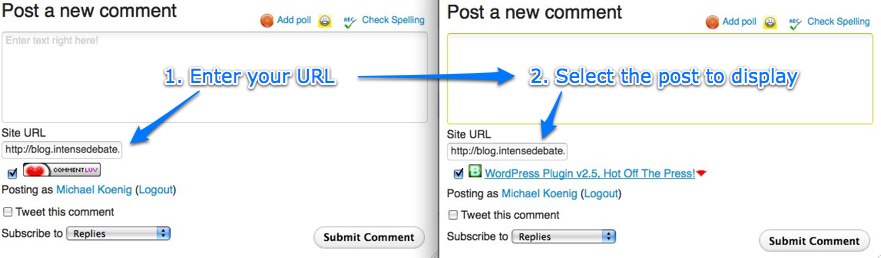
Using the CommentLuv plugin is a piece of cake. Just select the CommentLuv checkbox, enter your site URL, and select the post that you’d like to link to. Type your comment, hit submit, and voilà – you’re done! We’ve activated the plugin on our blog, so give a try below.

Interested in flexing your own coding muscles and developing a super-slick plugin? Check out our Plugin Resources and documentation. You can also check out our Plugins blog post for more information.
Hats off to Andy for his work to bring CommentLuv to IntenseDebate!
41.850033
-87.650052
Posted by Michael Koenig in features
10
Nov
2009
A little while back we opened up IntenseDebate for localization, and we received over 100 volunteers to help translate IntenseDebate to 43 languages. Within a couple of weeks we were able to launch translations for 11 languages: Arabic, Croatian, Filipino, French, German, Malay, Brazilian Portuguese, Russian, Latin American Spanish, European Spanish, and Ukrainian. This week we’re excited to release 6 additional translations.
Here are the new languages that we’re releasing, along with the awesome folks who contributed to each translation:
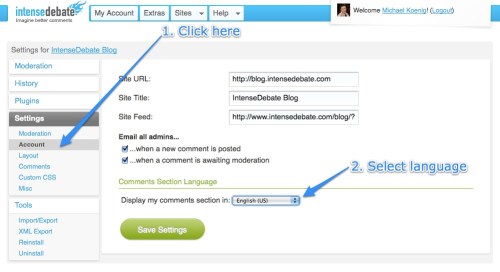
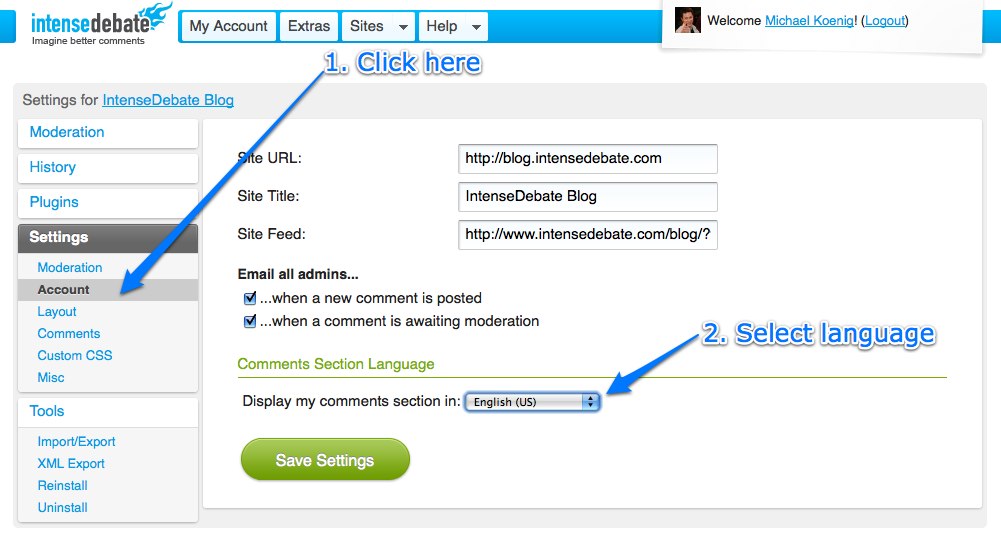
These translations are available in your Blog Settings page at IntenseDebate.com.
We’re looking forward to making more translations available for use as they continue to get completed. So far we’ve received volunteers to help translate these additional languages:
| Azeri |
Hungarian |
Portuguese (European) |
| Bahasa Indonesia |
Indonesian |
Romanian |
| Chinese |
Japanese |
Serbian |
| Czech |
Korean |
Swedish |
| Danish |
Maldives |
Romanian |
| Dutch |
Norwegian |
Turkish |
| Galician |
Persian |
| Hebrew |
Polish |
|
|
|
Don’t see your language? Give us a hand!
If you’re interested in getting involved, now is the perfect time! Please email us at labs@intensedebate.com for information. Ideally we’d like to have at least two Iñtërnâtiônàlizætiønër’s working together for each translation. Thanks!
Posted by Michael Koenig in community,features
24
Oct
2009
This is the first in a series of articles which will hopefully inspire and help you style the IntenseDebate comment system so it fits better with your blog. We’ve reached a point in IntenseDebate’s history where the basic HTML and CSS classes the comment system is built on is solid, so now you should be able to style it more than ever, without fear of your new styles breaking in future updates.
Styling IntenseDebate: Simplify comment design
If you have a really clean and simple blog, you might find IntenseDebate’s pretty glossy comment headers and rounded corners a bit too much. With just a few simple CSS rules, you can alter the comment header to your own liking. In this tutorial we’ll be modifying the .idc-c-h element, which is “ID language” for “.IntenseDebateComments-Comment-Header”.
How to use this guide
All styles can be added either to your “Custom CSS” box in your IntenseDebate admin panel (recommended, go to Settings>Custom CSS) or directly to your blogs/sites stylesheet.
- First, we’ll remove the normal background from the comment headers, apply a top border and make sure the padding and margins look good.
#idc-container-parent #idc-container .idc-c-h {

background: none;

border-top: 1px solid #ddd;

padding: 3px 0 0;

}
Background: none; means we’ve removed the normal background image. If you instead want a light gray background, you could try background: #f6f6f6;!
- Next, we’ll remove the spacing around the comment elements that make it not align with our new pretty top border. If you add in these CSS elements, you should know how all of the comment contents perfectly aligned with the top border:
#idc-container-parent #idc-container .idc-c-h-inner {

margin: 0;

}
#idc-container-parent #idc-container .idc-c-t,
#idc-container-parent #idc-container .idc-c-b {
margin-left: 0;
margin-right: 0;
}
#idc-container-parent #idc-container .idc-c-b .idc-btn_s {
margin-left: 0 !important;
}
- Lastly, if you still want a special look for the comments posted by an admin, we can apply a special styling to admin comments by using the class
.idc-c.idc-admin this class is used for all admin comments posted on your blog.
#idc-container-parent #idc-container .idc-c.idc-admin .idc-c-h {

border-top-color: #c00;

}
This style will exchange the light gray border we just added for a very fashionable dark red shade.
Tips on styling IntenseDebate:
- When you want to start styling IntenseDebate, and need to know what the elements in the comment system are called, we highly recommend FireBug, a developer extension for Firefox. Using the Inspect feature, you can just click the element you want to style, and it will bring up all the CSS associated by it, including what the element’s CSS class is. Pretty handy!
- Look up the element you want to style, for instance
.idc-c-h and then apply #idc-container-parent to the rule when you write the CSS. In this example, you would write #idc-container-parent #idc-container .idc-c-h to style .idc-c-h, the comment header.
- Put your new CSS rules in the Custom CSS box in your IntenseDebate admin panel, located at Settings>Custom CSS.
Make sure you check out our CSS Documentation for a complete list of elements you can style in IntenseDebate with tips on how to modify them, and feel free to let us know if you have any questions. Until next time!
Posted by Isaac Keyet in features
8
Oct
2009
 Every now and than then their there are times when we all slip-up with a misused word in a blog post. It’s slightly embarrassing to find after you publish your post, especially if someone has to point it out to you. Thankfully Raphael Mudge recently joined us at Automattic and is saving us from making careless mistakes with his intelligent proofreading technology, After the Deadline (download it here for your blog/website).
After The Deadline brings cutting-edge contextual spell checking, grammar checking, and style checking to the web, in a seamless service integration with the most popular online publishing tools and platforms (WordPress, TinyMCE, etc.). Through a combination of carefully-tuned statistical machine learning and NLP techniques, AtD’s sophisticated language models can catch and suggest corrections to subtle errors in context – even in poetry! http://bit.ly/badpoetry
AtD is that second set of eyes we all love to have to proofread our blog posts. Wouldn’t it be amazing to have that same expert spelling and grammar checking for your comments? Now you can with the After the Deadline IntenseDebate plugin! Raphael has been hard at work to bring you a lightweight solution to catch any spelling, misused words, and grammar errors before you post your comment.
 Give it a try when you post a comment. After typing your comment select the “Check Spelling” icon at the top right of comment textbox. Misspelled words will have a red underline while grammar errors will have a green underline. Because AtD uses artificial intelligence to identify misused words, you no longer have too to worry about contextual errors. Click the underlined word and you’ll be presented with alternative suggestions to correct your mistake.
Visit your Plugins page in your Blog Account admin panel to locate and activate the AtD plugin. Make sure you check out the rest of the IntenseDebate plugins while you’re there like PollDaddy Polls, Seesmic video comments, Smileys, and loads more. Learn more about our Plugins and Plugins API.
Posted by Michael Koenig in features
6
Oct
2009
We’re excited to announce the latest release for our IntenseDebate.com interface redesign: your brand new Admin Panel and Blog Account pages. We’re sure that you’ve noticed the unmistakable design changes to the Blog Overview, Moderation, Comment History, Plugins, Settings and Layout, and Tools pages, and we think you’ll agree that it’s a major improvement!
Over the past weeks we have released redesigns for our homepage, your User Account page, and your account Dashboard and Following page. These releases feature our new sidebar navigation. So far your feedback has been excellent, and we’re pleased to hear that you’ve found it to be much improved (we were told that it was “life changing” and we agree!).
Our old blog account pages were definitely due for an overhaul, especially the Settings page. That was our go-to page when we introduced new admin features, and admittedly it was getting a bit crowded. The redesign embraces the sidebar and has split your old Blog Settings into a couple of different tabs:
- Blog Account overview: manage email notification settings, blog title and RSS.
- Moderation: for all of your spam and moderation management tools.
- Layout: customize your comment section components and language options.
- Comments: manage Facebook Connect, Twitter Sign-in, along with all of your other comment settings.
- Custom CSS: this is a brand new tab where you can style and add new CSS to your comment section without having to upload files anywhere!
- Miscellaneous: customize your comment links among other elements.
Give it a try and let us know what you think! There’s more to come (especially for our moderation page) so keep an eye on our blog for more info.
Posted by Michael Koenig in features





 IntenseDebate - Official Blog