13
Jun
2009
We’ve been working away on a new version of the IntenseDebate Plugin for WordPress, and now it’s ready to come your way. This version contains a bunch of improvements and enhancements, mostly on the backend, and is also WordPress 2.8 compatible. Here’s the full list of changes, which is now included as a Changelog in the readme file included with the plugin (and which can be seen in the WordPress Plugin Directory):
- Compatible with WordPress 2.5 – 2.8
- Fixed a bug where versions of WordPress below 2.7 would turn off comment threading in IntenseDebate when saving Discussion Settings in WordPress
- Improved performance of the queue system used to sync details back and forth with IntenseDebate (reduced the number of database requests made significantly)
- Improved overall compatibility with WordPressMU (and props to Israel S. for contributed code!). Compatible WordPressMU 2.6 and 2.7.
- Improved debugging/logging options (you can now save debug details to your error log, database or both)
- Improved the initial import process (and there are some more improvements coming on this one)
- Improved security of the options page via better use of nonces and whitelisted options within WordPress (where available)
- Improved syncing of comment moderations
- Improved translatability so that we can get the plugin localized into other languages!
So as you can see, there’s a lot more in there than just WordPress 2.8 compatibility. In amongst all of this, there have also been a number of small improvements to the way that IntenseDebate interacts with WordPress and presents information to you while you are moderating comments.
If you’re using WordPress 2.5 or higher, or WordPressMU 2.6 or higher, we strongly recommend that you upgrade to this new version to get all the latest goodness!
If you haven’t started using IntenseDebate on your WordPress website yet, there’s no time like the present: Get started now and enhance your comments!
Posted by Beau Lebens in WordPress Plugin
14
May
2009
 Big news! We’re migrating our avatar system over to Gravatar! We’re all part of the Automattic family and Gravatar has it down, so as the saying goes, “why recreate the wheel?” This is going to be a gradual process so don’t panic.
What is a gravatar?
A gravatar, or globally recognized avatar, is quite simply an image that follows you from site to site appearing beside your name when you do things. Avatars help identify your posts on blogs and web forums, so why not on any site?
We’ve rolled out the first steps of this process. We now check to see if you have a gravatar and if you do, we’ll automatically use it. If you are using an IntenseDebate avatar instead of your gravatar then you’ll notice a change (unless your gravatar and IntenseDebate avatar are the same!). Our apologies for the inconvenience.
Next up, you might have noticed the blue message in your IntenseDebate account prompting you to verify your email address. This is to make sure you are who you say you are. 😉 If you haven’t verified your email address yet, please go ahead and do so.
We’ll keep you posted on the next phases of this project. If you haven’t discovered Gravatar yet, check it out and create your own!
Posted by Michael Koenig in features
1
May
2009
We’re excited to introduce two new plugins: AddToAny Share Buttons for both your comments and your posts! Enabling AddToAny Share Buttons lets your readers share, save, bookmark, and email comments using any service, such as Delicious, Digg, Facebook, Twitter, and over 100 more social bookmarking and sharing sites.
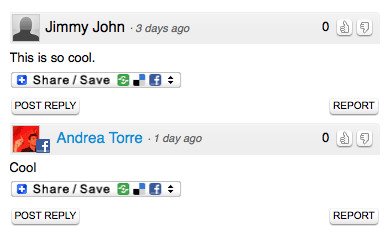
Enable AddToAny Share Buttons on your blog by visiting your Plugins page and select the Activate link next to the plugin. And don’t forget to check out our other plugins like PollDaddy polls, Seesmic video comments, YouTube, and Smileys. The AddToAny Share Buttons plugins were developed by our friend Pat, who helps run AddToAny blog share buttons.
Interested in flexing your own coding muscles and developing a super-sweet plugin? Check out our Plugin Resources and documentation. You can also check out our Plugins blog post to find out more information.
Many thanks to Pat and his team for their phenomenal work and addition to IntenseDebate!
Posted by Michael Koenig in features
30
Apr
2009
You guys have helped IntenseDebate grow a huge amount over the past few months. Overall this is great! We love helping people take the conversation on their blog / website to the next level, and of course once you get IntenseDebate going you know you grow even faster. It has put quite a strain on our systems though. I’m sure you’re all aware of our outages over the last few weeks.
We’ve been working non-stop to address these issues. Our highest priority is improving the performance and long term scalability of IntenseDebate for you.
Now we could leave it at that, be completely opaque about what changes we’re doing and just hope that you’ll trust that we’re working hard on the problem, but you all deserve more and need to trust that our service can perform for you. So here’s a behind-the-scenes peek for those of you interested in how we’re tackling this problem.
The first major change we’ve been working on is sharding some of our larger and most frequently used tables into a more efficient and scalable database schema. For those of you not familiar with sharding it means storing all your data in several smaller tables instead of one large monolithic table. This allows us to get your data much more quickly and makes for a much more horizontally scalable system. (We can continue to add more tables to keep them small as our total data storage increases.) This is complete for our most heavily used data, comments, and will continue where appropriate.
The second change is creating more summary tables to simplify the retrieval of common data. Even after sharding some of the data is still too slow to compute on-the-fly. Summary tables cache frequently used computations which will allow us to get this information almost instantly.
Last, but not least, we’re optimizing our logging and background processing. We do quite a bit of logging to ensure things are running smoothly and to help debug quickly when things don’t. In particular the syncing process to and from WordPress blogs has a lot of activity we store for troubleshooting. We’ve done some work to make this logging faster and less system heavy, as well as some fine tuning of what and when we log in order to help ensure that these troubleshooting tools don’t have a negative impact on the performance of the core service.
I want to reiterate we’re acutely aware of performance over the last few weeks and there is no excuse for poor service or performance. We’ve fixed the most pressing issues, but we’re taking a number of proactive steps to ensure that we can maintain the level of service that you deserve from us. Thank you all for your patience and understanding.
Posted by Jon Fox in News
24
Apr
2009
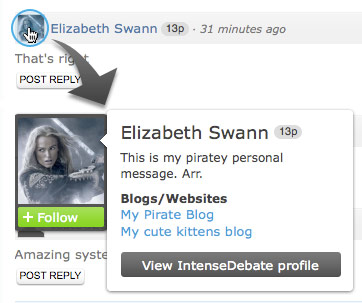 We’ve rolled out some cool changes to your User Menu! Ever notice that when you hover your mouse cursor over a user’s profile picture, their User Menu drops down displaying links to their profile, blogs, and more? Well the User Menus just got a whole lot more useful!
Not only do they look super-sweet, they also present higher quality info right up front, while minimizing the footprint. Now you can quickly learn about your fellow commenters. We’ve got some more changes to the comment section coming soon.
So what’s new in the User Menu?
- Profile Picture now blows-up so you can get a good look at it.
- Reputation Score is included.
- User Description & Latest Tweet are both there so you don’t have to choose one or the other.
- Slick New Look
So now when you hover her avatar you’ll get a better look at miss Swann and learn more about her all at the same time! Not too shabby!
If you haven’t given IntenseDebate a try yet, there’s no better time than now! Get started with IntenseDebate.
Posted by Michael Koenig in features