12
Nov
2009
Andy Bailey, the code ninja behind CommentLuv, has been working to get CommentLuv integrated with IntenseDebate, and we’re pumped to let you know that the shiny new ID CommentLuv plugin is ready for primetime! CommentLuv has been always been a widely requested feature, and with good reason – it’s the perfect fit for IntenseDebate, and will go a long way in helping strengthen your community. You can check out Andy’s post here.
So what’s CommentLuv?
CommentLuv rewards your readers and helps you discover new and interesting posts by automatically adding a titled link to the comment authors last blog post when they comment.
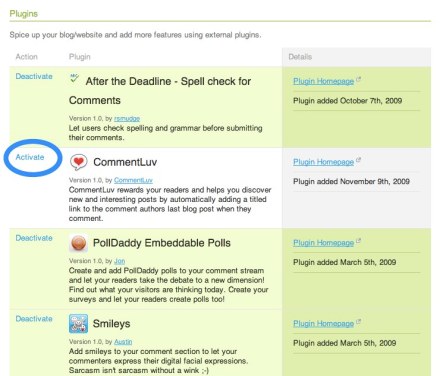
Just like all of our plugins, activating is one simple click of the mouse and you’re done. When you’re logged in, go to http://intensedebate.com/plugins, find the CommentLuv plugin, and hit “Activate”. That’s it! Make sure you check out our other plugins like PollDaddy Polls, After the Deadline spelling and grammar checker, and loads more.
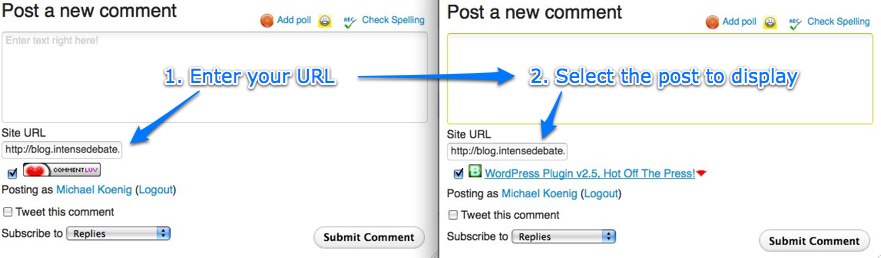
Using the CommentLuv plugin is a piece of cake. Just select the CommentLuv checkbox, enter your site URL, and select the post that you’d like to link to. Type your comment, hit submit, and voilà – you’re done! We’ve activated the plugin on our blog, so give a try below.

Interested in flexing your own coding muscles and developing a super-slick plugin? Check out our Plugin Resources and documentation. You can also check out our Plugins blog post for more information.
Hats off to Andy for his work to bring CommentLuv to IntenseDebate!
41.850033
-87.650052
Posted by Michael Koenig in features
10
Nov
2009
It’s been a while now (almost 3 months!) since the last update to our WordPress plugin, and a lot has been going on here at IntenseDebate HQ since then. We’ve been working on our end to improve how the plugin interacts with our servers, and now we’re ready to release a new version which updates how it operates as well. Here are some of the new and improved bits in this version:
- Added a bunch of new API functions to enable better remote queue management (for syncing): get comment counts, get approved comment counts, get a copy of your sync queue, manage individual operations, lock queue temporarily
- Improved handling of duplicate comments
- Improved syncing on comment statuses
- Fixed a bug with closing comments on a Post/Page
- Added partial support for the Trash feature coming in WordPress 2.9*
- Added functionality to allow us to re-import a single Post to help fix up any sync problems (more efficient than re-importing your entire site)
- Lots of small improvements and fixes to the way the sync queue operates to avoid overloading your site (and ours) and to increase the success of requests.
* We’re going to be releasing an update in the near future, once we sort out a few remaining issues with the Trash functionality. When you upgrade to WordPress 2.9 (once it’s released!) you’ll also want to upgrade to that new version.
This version of the plugin has gone through a load of testing on WordPress versions 2.5, right up to the current “trunk” and WordPressMU version 2.6 to the current release (2.8.5.2). We’d like to note that in the next versions, we’re going to drop support for versions of WordPress below 2.7, so if for some reason you’re running an old version of WordPress, we’d strongly recommend that you upgrade!
If you are already using IntenseDebate on your WordPress blog then you should see a plugin update notification in your admin dashboard soon. If you haven’t tried us out yet, then now is the perfect time, with our best plugin release to date! You can search for the plugin (“IntenseDebate Comments”) under Plugins > Add New, or download it directly from the WordPress Plugin Directory.
37.791291
-122.417544
Posted by Beau Lebens in WordPress Plugin
10
Nov
2009
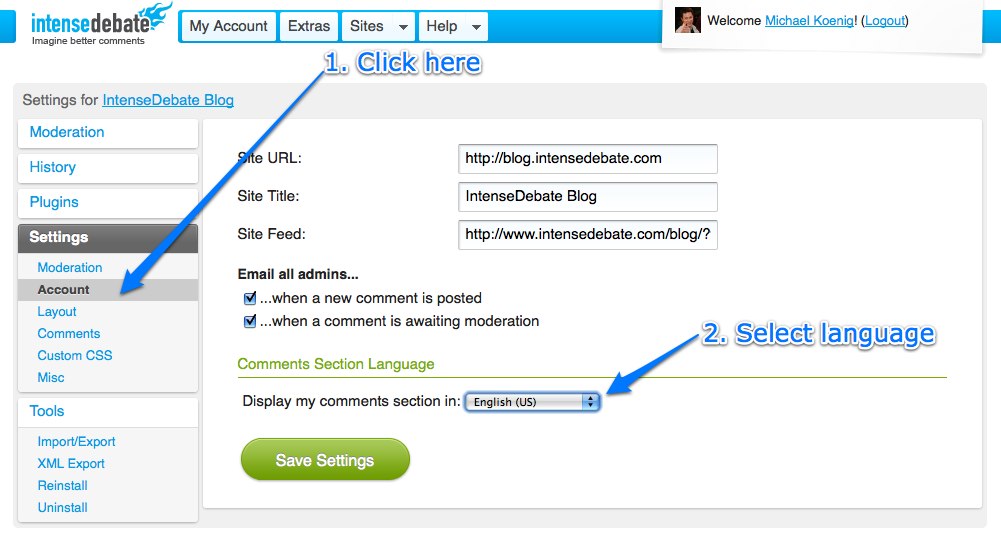
A little while back we opened up IntenseDebate for localization, and we received over 100 volunteers to help translate IntenseDebate to 43 languages. Within a couple of weeks we were able to launch translations for 11 languages: Arabic, Croatian, Filipino, French, German, Malay, Brazilian Portuguese, Russian, Latin American Spanish, European Spanish, and Ukrainian. This week we’re excited to release 6 additional translations.
Here are the new languages that we’re releasing, along with the awesome folks who contributed to each translation:
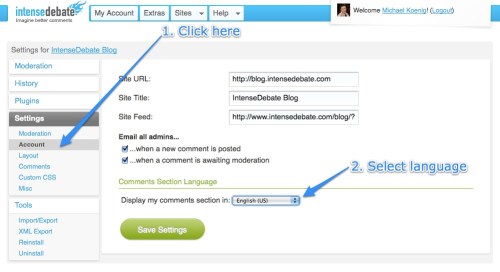
These translations are available in your Blog Settings page at IntenseDebate.com.
We’re looking forward to making more translations available for use as they continue to get completed. So far we’ve received volunteers to help translate these additional languages:
| Azeri |
Hungarian |
Portuguese (European) |
| Bahasa Indonesia |
Indonesian |
Romanian |
| Chinese |
Japanese |
Serbian |
| Czech |
Korean |
Swedish |
| Danish |
Maldives |
Romanian |
| Dutch |
Norwegian |
Turkish |
| Galician |
Persian |
| Hebrew |
Polish |
|
|
|
Don’t see your language? Give us a hand!
If you’re interested in getting involved, now is the perfect time! Please email us at labs@intensedebate.com for information. Ideally we’d like to have at least two Iñtërnâtiônàlizætiønër’s working together for each translation. Thanks!
Posted by Michael Koenig in community,features
2
Nov
2009
There are loads of interesting debates happening across the IntenseDebate network. One of our goals is to highlight those conversations so you can check them out and add your own two cents. We’re all about content discovery, and we’re always looking for new ways to do this.
We are kicking off a new series of blog entries that feature cool debates and blog posts taking place across the IntenseDebate network, and we would love your help. Leave us a comment and let us know about interesting conversations and posts that you’ve come across or participated in. If it’s super-cool we’ll feature it right here on our blog and give it some link-love.
Here’s how you can get involved:
- Keep an eye out for interesting conversations and cool blog posts as you cruise around the interweb.
- Grab the comment permalink or blog post link (instructions below), paste it in a comment below, and let us know why you dig it.
Grabbing a permalink:
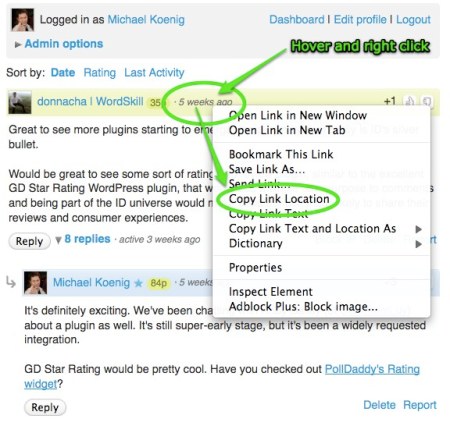
- Locate the timestamp for the comment (formatted as “10 minutes ago”)
- Hover your mouse cursor over the timestamp and right-click with your mouse.
- Depending on which web browser you’re using, there will be an option to “Copy Link Location” or “Copy Link”.
- Select that, and then paste it in your comment below.
Thanks for your help!
Posted by Michael Koenig in feedback
24
Oct
2009
This is the first in a series of articles which will hopefully inspire and help you style the IntenseDebate comment system so it fits better with your blog. We’ve reached a point in IntenseDebate’s history where the basic HTML and CSS classes the comment system is built on is solid, so now you should be able to style it more than ever, without fear of your new styles breaking in future updates.
Styling IntenseDebate: Simplify comment design
If you have a really clean and simple blog, you might find IntenseDebate’s pretty glossy comment headers and rounded corners a bit too much. With just a few simple CSS rules, you can alter the comment header to your own liking. In this tutorial we’ll be modifying the .idc-c-h element, which is “ID language” for “.IntenseDebateComments-Comment-Header”.
How to use this guide
All styles can be added either to your “Custom CSS” box in your IntenseDebate admin panel (recommended, go to Settings>Custom CSS) or directly to your blogs/sites stylesheet.
- First, we’ll remove the normal background from the comment headers, apply a top border and make sure the padding and margins look good.
#idc-container-parent #idc-container .idc-c-h {

background: none;

border-top: 1px solid #ddd;

padding: 3px 0 0;

}
Background: none; means we’ve removed the normal background image. If you instead want a light gray background, you could try background: #f6f6f6;!
- Next, we’ll remove the spacing around the comment elements that make it not align with our new pretty top border. If you add in these CSS elements, you should know how all of the comment contents perfectly aligned with the top border:
#idc-container-parent #idc-container .idc-c-h-inner {

margin: 0;

}
#idc-container-parent #idc-container .idc-c-t,
#idc-container-parent #idc-container .idc-c-b {
margin-left: 0;
margin-right: 0;
}
#idc-container-parent #idc-container .idc-c-b .idc-btn_s {
margin-left: 0 !important;
}
- Lastly, if you still want a special look for the comments posted by an admin, we can apply a special styling to admin comments by using the class
.idc-c.idc-admin this class is used for all admin comments posted on your blog.
#idc-container-parent #idc-container .idc-c.idc-admin .idc-c-h {

border-top-color: #c00;

}
This style will exchange the light gray border we just added for a very fashionable dark red shade.
Tips on styling IntenseDebate:
- When you want to start styling IntenseDebate, and need to know what the elements in the comment system are called, we highly recommend FireBug, a developer extension for Firefox. Using the Inspect feature, you can just click the element you want to style, and it will bring up all the CSS associated by it, including what the element’s CSS class is. Pretty handy!
- Look up the element you want to style, for instance
.idc-c-h and then apply #idc-container-parent to the rule when you write the CSS. In this example, you would write #idc-container-parent #idc-container .idc-c-h to style .idc-c-h, the comment header.
- Put your new CSS rules in the Custom CSS box in your IntenseDebate admin panel, located at Settings>Custom CSS.
Make sure you check out our CSS Documentation for a complete list of elements you can style in IntenseDebate with tips on how to modify them, and feel free to let us know if you have any questions. Until next time!
Posted by Isaac Keyet in features




 IntenseDebate - Official Blog